微软Visual Studio Copilot新增Agent Skills功能,教Copilot如何适应团队工作流程

TL;DR · AI 摘要
微软Visual Studio Copilot的新功能Agent Skills,允许团队根据自己的工作流程定制Copilot的行为。
核心要点
- Copilot现在支持自定义技能以适应团队的工作流程。
- 通过Agent Skills,开发者可以提高生产力并更好地集成AI助手。
- 该功能有助于解决不同团队在使用AI时遇到的具体问题。
结构提纲
按章节快速跳转。
- §引言
介绍Visual Studio Copilot的新功能Agent Skills。
Agent Skills是一种新的Copilot功能,允许用户根据团队需求调整Copilot行为。
通过设置和训练,用户可以指导Copilot完成特定任务。
- ·案例研究
展示几个团队如何利用Agent Skills改进其开发流程。
- ·未来展望
讨论Agent Skills在未来可能的发展方向。
思维导图
用一张图看清主题之间的关系。
查看大纲文本(无障碍 / 无 JS 友好)
- Agent Skills in Visual Studio
- 功能介绍
- 自定义Copilot行为
- 使用方法
- 设置和训练
- 案例研究
- 提高开发效率
金句 / Highlights
值得收藏与分享的关键句。
通过Agent Skills,你可以教Copilot如何处理你的团队特有的代码风格和工作流程。
这将帮助开发者更高效地编写代码,减少错误,提高生产力。
微软计划继续扩展Agent Skills的功能,使其更加灵活和强大。
Agent Skills in Visual Studio: Teach Copilot How Your Team Works - Visual Studio Blog
[Skip to main content](javascript:void(0))

Dev Blogs
Dev Blogs
* .NET
- All .NET posts
- Frameworks Frameworks
- Aspire
- .NET MAUI
- ASP.NET Core
- Blazor
- Entity Framework
- Languages Languages
- C++
- C#
- F#
- TypeScript
* Developer
- Microsoft for Developers
- Agent Framework
- Develop from the cloud
- Xcode
- ISE Developer
- TypeScript
- PowerShell
- Python
- Java
- Java Blog in Chinese
- Go
- Microsoft Edge Dev
- Microsoft 365 Developer
- Microsoft Entra Identity Developer
- Microsoft Entra PowerShell
* Platform and Tools
- Visual Studio
- Visual Studio Code
- Azure Azure
- All things Azure
- Azure SDK
- Azure Government
- Azure VM Runtime Team
- Microsoft Azure
- Azure Cosmos DB
- Azure Data Studio
- Azure SQL
* Data
* Windows
- Windows Command Line
- #ifdef Windows
- Inside MSIX
- MIDI and music
- React Native
- The Old New Thing
- Windows Developer
- More
Search Search
- No results
Cancel
- Dev Blogs
- Visual Studio Blog
- Agent Skills in Visual Studio: Teach Copilot How Your Team Works
May 13th, 2026
0 reactions
Agent Skills in Visual Studio: Teach Copilot How Your Team Works

[Show more](javascript:)
Visual Studio now supports Agent Skills, which are reusable instruction sets that teach Copilot agents how to handle specific tasks like running a build pipeline, generating boilerplate, or following your team’s coding standards. Define a skill once, and the agent applies it automatically whenever it’s relevant.
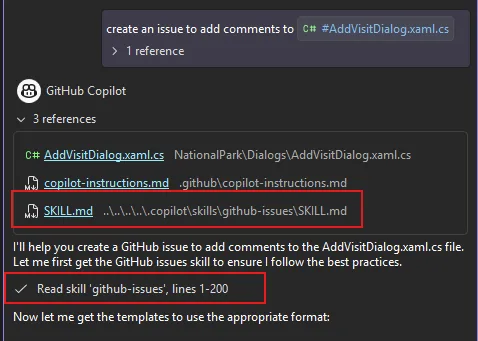
Creating a skill
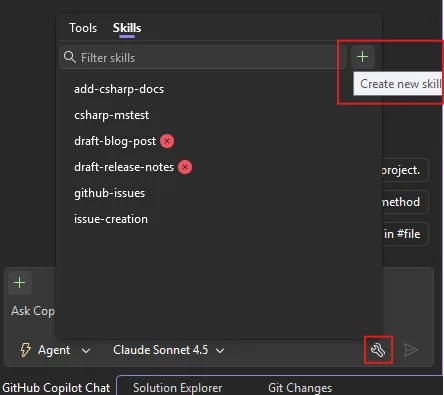
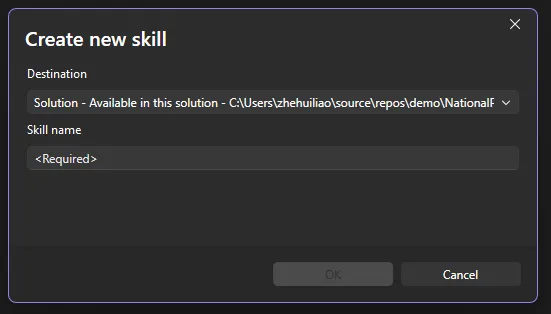
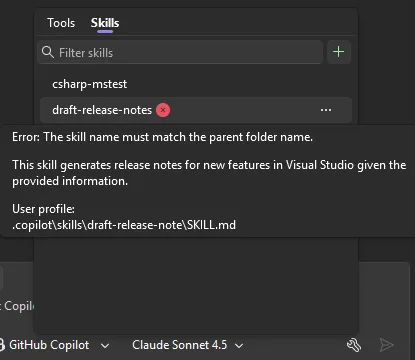
You can create a skill directly from within Visual Studio. Click the tools icon in the bottom-right corner of Copilot Chat to open the skills panel,a dedicated view of every discovered skill. Click the + button in the top-right corner of the panel and follow the guided flow: choose a destination (global or solution-level skill), pick a name, and Visual Studio generates a skill template for you to fill in. Copilot Agent mode can then assist you in filling in the template. Currently this flow is only available in the _Insiders_ channel and will be in Release soon.
You can also create a skill manually:
- Create a skill directory in your repository (
.github/skills/my-skill/) or user profile (~/.copilot/skills/my-skill/). - Add a
SKILL.mdfile following the agentskills.io/specification format. - Optionally include scripts, templates, or examples alongside it.
For example, you could have two skills, github-issues and code-review like this:
.github/
  skills/
    github-issues/
      SKILL.md
      templates/
        bug-report.md
    code-review/
      SKILL.md
      checklist.md
Skills are auto-discovered from these locations:
- Solution skills (shared via your solution):
.github/skills/,.claude/skills/,.agents/skills/ - Global/Personal skills (shared via your user profile and available across solutions):
~/.copilot/skills/,~/.claude/skills/,~/.agents/skills/
When a skill activates, it appears in the chat window so you always know what’s being applied.
If you are not sure where to start or what skills to create, please check out awesome-copilot for many great community examples!
Managing skills from the skills panel
In addition to creating new skills, you can also manage your skills easily from the skills panel.
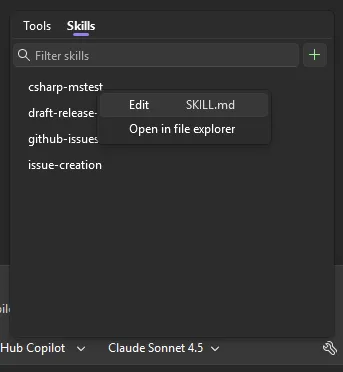
From the panel you can:
- Edit — Open any skill’s
SKILL.mddirectly in the editor via the ⋯ menu. - Open file location — Jump to the skill directory on disk.
- Search — Filter skills by name or keyword.
The panel also surfaces diagnostics for any skill configuration errors, so you can quickly spot and fix issues.
Skills vs. Custom Instructions: when to use what
You may already be using custom instructions (.github/copilot-instructions.md) to guide your Copilot’s behavior. Custom instructions are great for broad, always-on guidance, such as things like “use tabs, not spaces” or “prefer async/await over callbacks.” They are automatically applied to every interaction you have with Copilot.
Agent Skills are different. Skills are task-specific and dynamically loaded. The model decides when a skill is relevant and applies it only in matching contexts.
| | Custom Instructions | Agent Skills | | --- | --- | --- | | Scope | Always active | Activated per-task | | Best for | Coding style, conventions, general preferences | Workflows, templates, multi-step procedures | | Structure | Single markdown file | Directory with SKILL.md + supporting files | | Examples | “Use PascalCase for public methods” | “When creating a GitHub issue, use this template and include severity, repro steps, and environment info” |
Use custom instructions for rules that should always apply. Use skills for specialized workflows that only matter in certain contexts. Another way to extend your agent’s capabilities is through MCP tools, which let the agent interact with external services and APIs. Skills and MCP tools complement each other well — a skill can describe _how_ to handle a task while an MCP tool provides the _capability_ to execute it.
Please give Agent Skills a try and share your feedback in the comments or on Developer Community.
Happy coding!
[0](https://devblogs.microsoft.com/visualstudio/wp-login.php?redirect_to=https%3A%2F%2Fdevblogs.microsoft.com%2Fvisualstudio%2Fagent-skills-in-visual-studio%2F "Sign in to react")
[0](https://devblogs.microsoft.com/visualstudio/agent-skills-in-visual-studio/#comments "Go to comments section")
2
- 
- [Share on X](https://twitter.com/intent/tweet?url=https://devblogs.microsoft.com/visualstudio/agent-skills-in-visual-studio/&text=Agent%20Skills%20in%20Visual%20Studio:%20Teach%20Copilot%20How%20Your%20Team%20Works "Share on X")
- 
Category
Topics
Share
- [](https://www.facebook.com/sharer/sharer.php?u=https://devblogs.microsoft.com/visualstudio/agent-skills-in-visual-studio/)
- [](https://twitter.com/intent/tweet?url=https://devblogs.microsoft.com/visualstudio/agent-skills-in-visual-studio/&text=Agent%20Skills%20in%20Visual%20Studio:%20Teach%20Copilot%20How%20Your%20Team%20Works)
- [](https://www.linkedin.com/shareArticle?mini=true&url=https://devblogs.microsoft.com/visualstudio/agent-skills-in-visual-studio/)
Author
0 comments
Be the first to start the discussion.
[Leave a comment](javascript:void(0) "Leave a comment")[Cancel reply](https://devblogs.microsoft.com/visualstudio/agent-skills-in-visual-studio/#respond)
Read next
April 30, 2026
[TypeScript 7 Beta Now Enabled by Default in Visual Studio 2026 18.6 Insiders 3](https://devblogs.microsoft.com/visualstudio/typescript-7-beta-now-enabled-by-default-in-visual-studio-2026-18-6-insiders-3/)

Sayed Ibrahim Hashimi
April 29, 2026
[SDK-Style Support for Extension Projects](https://devblogs.microsoft.com/visualstudio/sdk-style-support-for-extension-projects/)

Matt Clark
Stay informed
Get notified when new posts are published.
Email *
Country/Region *
I would like to receive the Visual Studio Blog Newsletter. Privacy Statement.
Subscribe
Follow this blog
- 
- [](https://twitter.com/VisualStudio "twitter")
- 
- 
- 
- 
- [](https://devblogs.microsoft.com/visualstudio/feed/ "RSS Feed")
Are you sure you wish to delete this comment?
OK Cancel
Theme
Insert/edit link
Close
Enter the destination URL
URL
Link Text
- [x] Open link in a new tab
Or link to existing content
Search
_No search term specified. Showing recent items._ _Search or use up and down arrow keys to select an item._
Cancel
##### Code Block
×
Paste your code snippet
Ok Cancel
What's new
- Surface Pro
- Surface Laptop
- Surface Laptop Studio 2
- Copilot for organizations
- Copilot for personal use
- AI in Windows
- Explore Microsoft products
- Windows 11 apps
Microsoft Store
- Account profile
- Download Center
- Microsoft Store support
- Returns
- Order tracking
- Certified Refurbished
- Microsoft Store Promise
- Flexible Payments
Education
- Microsoft in education
- Devices for education
- Microsoft Teams for Education
- Microsoft 365 Education
- How to buy for your school
- Educator training and development
- Deals for students and parents
- AI for education
Business
- Microsoft AI
- Microsoft Security
- Dynamics 365
- Microsoft 365
- Microsoft Power Platform
- Microsoft Teams
- Microsoft 365 Copilot
- Small Business
Developer & IT
- Azure
- Microsoft Developer
- Microsoft Learn
- Support for AI marketplace apps
- Microsoft Tech Community
- Microsoft Marketplace
- Software companies
- Visual Studio
Company
- Careers
- About Microsoft
- Company news
- Privacy at Microsoft
- Investors
- Diversity and inclusion
- Accessibility
- Sustainability
Your Privacy ChoicesConsumer Health Privacy
- Sitemap
- Contact Microsoft
- Privacy
- Manage cookies
- Terms of use
- Trademarks
- Safety & eco
- Recycling
- About our ads
- © Microsoft 2026
[](https://devblogs.microsoft.com/visualstudio/agent-skills-in-visual-studio/#page "Back to top")