Organizing Agents’ memory at scale: Namespace design patterns in AgentCore Memory

TL;DR · AI 摘要
本文介绍了如何在Amazon Bedrock AgentCore Memory中通过命名空间设计模式来组织和管理AI代理的长期记忆,以实现高效检索和安全访问。
核心要点
- 命名空间是分层路径,用于组织AgentCore Memory中的长期记忆记录。
- 设计命名空间时需考虑访问者、检索粒度及隔离边界。
- 使用预定义变量创建命名空间模板,支持动态解析。
结构提纲
按章节快速跳转。
- §引言
介绍AI代理在跨会话记忆组织上的挑战,并提出命名空间作为解决方案。
解释命名空间的概念及其在组织和检索长期记忆中的作用。
说明如何使用预定义变量创建和解析命名空间模板。
讨论不同记忆策略下的命名空间设计模式。
思维导图
用一张图看清主题之间的关系。
查看大纲文本(无障碍 / 无 JS 友好)
- 命名空间设计模式
金句 / Highlights
值得收藏与分享的关键句。
命名空间提供逻辑结构,支持范围检索和访问控制。
确定谁需要访问这些记忆:单个用户?所有代理用户?
命名空间支持层次检索,而不仅仅是精确匹配。
When building AI agents, developers struggle with organizing memory across sessions, which leads to irrelevant context retrieval and security vulnerabilities. AI agents that remember context across sessions need more than only storage. They need organized, retrievable, and secure memory. In Amazon Bedrock AgentCore Memory, _namespaces_ determine how long-term memory records are organized, retrieved, and who can access them. Getting the namespace design right is essential to building an effective memory system.
In this post, you will learn how to design namespace hierarchies, choose the right retrieval patterns, and implement AWS Identity and Access Management (IAM)-based access control for AgentCore Memory. If you’re new to AgentCore Memory, we recommend reading our introductory blog post first: Amazon Bedrock AgentCore Memory: Building context-aware agents.
What are namespaces?
_Namespaces_ are hierarchical paths that organize long-term memory records within an AgentCore Memory resource. Think of them like directory paths in a file system. They provide logical structure, enable scoped retrieval, and support access control.
When AgentCore Memory extracts long-term memory records from your conversations, each memory record is stored under a namespace. For example, a user’s preferences might live under /actor/customer-123/preferences/, while their session summaries might be stored at /actor/customer-123/session/session-789/summary/. With this structure, you can retrieve memory records at exactly the right level of granularity.
If you’ve worked with partition keys in Amazon DynamoDB or folder structures in Amazon Simple Storage Service (Amazon S3), the mental model transfers well. Just as you think through access patterns before choosing a partition key or designing your S3 folder hierarchy, you should think through your retrieval patterns before designing your namespace structure. Determine:
- Who needs to access these memories: A single user? All users of an agent?
- Granularity of retrieval you need: Is it per-session summaries? Cross-session preferences?
- Isolation boundaries that matter: Should one user’s memories ever be visible to another? Agent-scoped memories?
The main difference from a partition key is that namespaces support hierarchical retrieval in addition to exact match. You can query at each level of the hierarchy, not only at the leaf level. You can use a well-designed namespace to retrieve memories scoped to a single session, a single user across sessions, or a broader grouping, from the same memory resource. Namespaces are logical groupings within the same underlying storage. They provide organizational structure and access control, but long-term memory records across different namespaces co-exist within the same memory resource. Your hierarchy is your primary tool for organizing data for effective retrieval patterns.
Namespace templates and resolution
When creating a memory resource, you define namespace templates using the namespaceTemplate field within each strategy configuration. Templates support three pre-defined variables:
{actorId}– resolves to the actor identifier from the events being processed{sessionId}– resolves to the session identifier from the events{memoryStrategyId}– resolves to the strategy identifier
Here’s an example of creating a memory resource with namespace templates:
response = agentcore_client.create_memory(
    name="CustomerSupportMemory",
    description="Memory for customer support agents",
    eventExpiryDuration=30,
    memoryStrategies=[
        {
            "semanticMemoryStrategy": {
                "name": "customer-facts",
                "namespaceTemplate": "/actor/{actorId}/facts/"
            }
        },
        {
            "summaryMemoryStrategy": {
                "name": "session-summaries",
                "namespaceTemplate": "/actor/{actorId}/session/{sessionId}/summary/"
            }
        }
    ]
)
CSS
When events arrive for actorId=customer-456 in sessionId=session-789, the resolved namespaces become:
/actor/customer-456/facts//actor/customer-456/session/session-789/summary/
Namespace design per memory strategy
Each memory strategy has different scoping needs, and the namespace design should reflect how that data will be accessed. Below are some common namespace design patterns for different memory strategies.
1. Semantic and user preferences: Actor-scoped
Semantic memory captures facts and knowledge from conversations (for example, “The customer’s company has 500 employees”). User Preference Memory captures choices and styles (for example, “User prefers Python for development work”). Both memory types accumulate over time and are relevant across sessions. A fact learned in January should still be retrievable in March. For these strategies, scope the namespace to the actor:
/actor/{actorId}/facts/
/actor/{actorId}/preferences/
CSS
This means the facts and preferences for a given user are consolidated under a single namespace, regardless of which session they were extracted from. The consolidation engine merges related memories within the same namespace. Look at figure 1 for an example of how scoping impacts the consolidation logic.
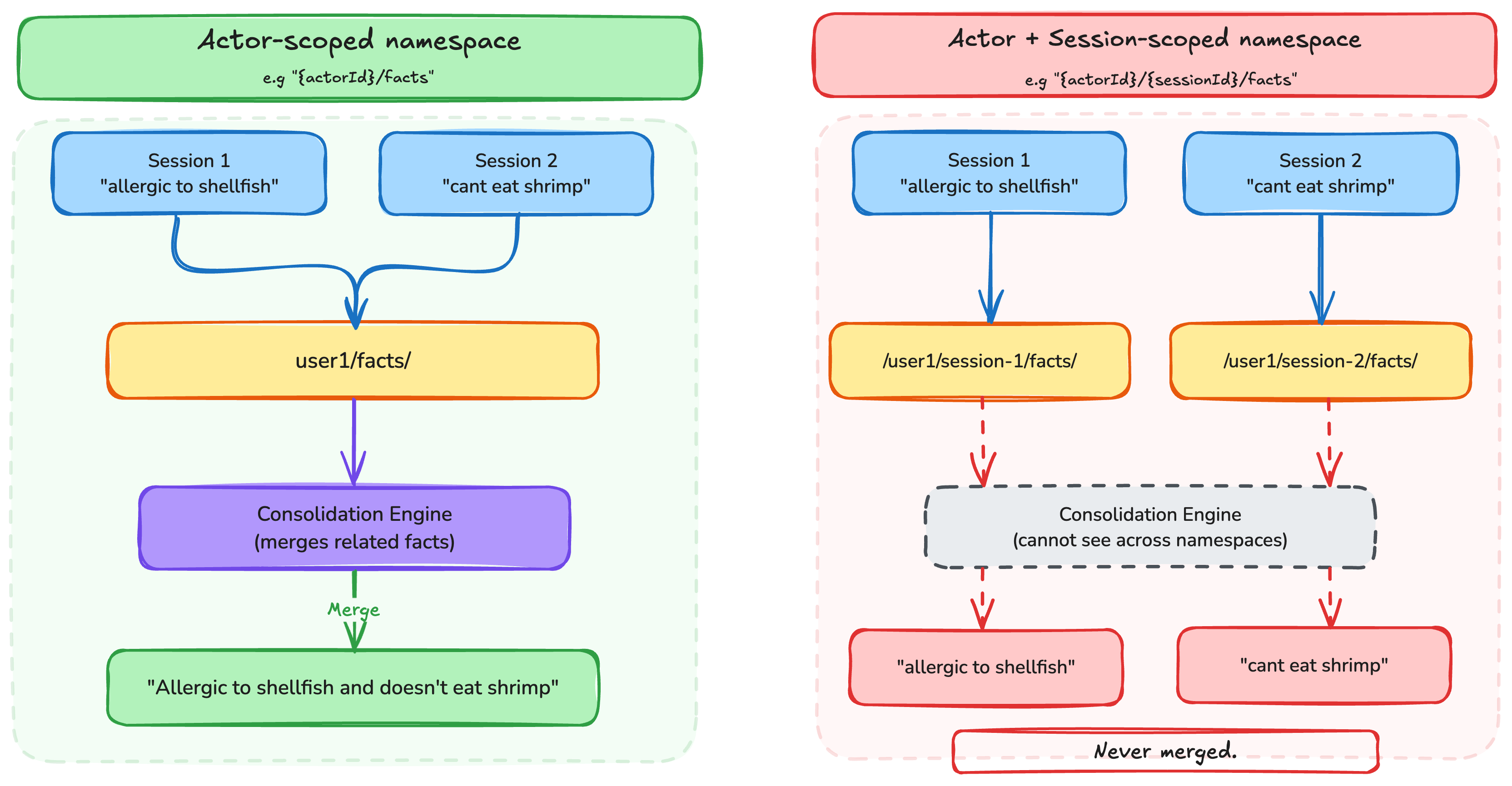
The following diagram illustrates how actor-scoped semantic and preference memories are organized:
Memory Resource: CustomerSupportMemory
│
├── /actor/customer-123/
│   ├── facts/
│   │   ├── "Company has 500 employees across Seattle, Austin, Boston"
│   │   ├── "Currently migrating from on-premises to cloud"
│   │   └── "Primary contact is the VP of Engineering"
│   └── preferences/
│       ├── "Prefers email communication over phone"
│       └── "Usually prefers detailed technical explanations"
│
├── /actor/customer-456/
│   ├── facts/
│   │   ├── "Startup with 20 employees"
│   │   └── "Using serverless architecture"
│   └── preferences/
│       └── "Prefers concise, high-level summaries"
Python
In some use cases, an admin might need to retrieve information across actors while keeping memories organized per actor. For example, a customer support agent might need to look up known issues reported by other customers, or a sales agent might need to find similar customer profiles across its user base. For such cases, structure the namespace with the actor identifier as a child of the memory type rather than as the parent:
/customer-issues/{actorId}/
/sales/{actorId}/
Code
With this inverted structure, you can use namespacePath="/customer-issues/" to retrieve common issues raised across all customers, while still maintaining a per-actor organization. A query scoped to namespace="/customer-issues/customer-123/" returns only that actor’s reported issues, preserving isolation when needed.
2. Summary: Session-scoped
Summary memory creates running narratives of conversations, capturing main points and decisions. Instead of feeding an entire conversation history into the large language model’s (LLM) context window, you can retrieve a compact summary that preserves the key information while significantly reducing token usage. Because summaries are inherently tied to a specific conversation, they should include the session identifier:/actor/{actorId}/session/{sessionId}/summary/This scoping means that each session gets its own summary, while still being organized under the actor for cross-session retrieval when needed.
Memory Resource: CustomerSupportMemory
│
├── /actor/customer-123/
│   ├── session/session-001/summary/
│   │   └── "Customer inquired about enterprise pricing, discussed
│   │        implementation timeline, requested follow-up demo"
│   ├── session/session-002/summary/
│   │   └── "Follow-up on demo scheduling, confirmed Q3 timeline,
│   │        discussed integration requirements with existing CRM"
│   └── session/session-003/summary/
│       └── "Technical deep-dive on API integration, reviewed
│            authentication options, chose OAuth 2.0 approach"
Code
3. Episodic: Session-scoped with reflection hierarchy
Episodic memory captures complete reasoning traces, including the goal, steps taken, outcomes, and reflections. Because each episode represents what happened during a specific interaction, episodes should be scoped to the session, similar to summaries. For example, a flight booking agent might store an episode capturing how it searched for flights, compared options, handled a fare class restriction, and ultimately rebooked the customer on an alternative route. That episode belongs to the session where it occurred. Reflections are cross-episode insights stored at a parent level. They generalize learnings across sessions, for instance “when a fare class restriction blocks a modification, immediately search for alternative flights rather than just explaining the policy.” The namespace for reflections must be a sub-path of the namespace for episodes:
Episodes:    /actor/{actorId}/session/{sessionId}/episodes/
Reflections: /actor/{actorId}/
CSS
**Retrieval patterns**
Retrieval APIs
AgentCore Memory provides three primary retrieval APIs for long-term memory, each suited to different access patterns. Choosing the right one is key to building effective agents.
#### 1. Semantic search with RetrieveMemoryRecords
Use RetrieveMemoryRecords to find memories that are semantically relevant to a query. This is the primary retrieval method during agent interactions, surfacing the most relevant memories based on meaning, rather than exact text matching.
# Retrieve memories relevant to the current user query
memories = agentcore_client.retrieve_memory_records(
    memoryId="mem-12345abcdef",
    namespace="/actor/customer-123/facts/",
    searchCriteria={
        "searchQuery": "What cloud migration approach is the customer using?",
        "topK": 5
    }
)
CSS
The search query can come from two sources:
- Directly from the user query – Pass the user’s question as-is when it naturally maps to the kind of information stored in memory. For example, if the user asks “What’s my budget?”, that query works well for retrieving preference or fact memories.
- LLM-generated query – For more complex scenarios, have your agent’s LLM formulate a targeted search query. This is useful when the user’s raw input doesn’t directly map to stored memories. For example, if the user says “Help me plan my next trip,” the LLM might generate a search query like “travel preferences, destination history, budget constraints” to retrieve the most relevant memories. Note that this adds latency.
#### 2. Direct retrieval with ListMemoryRecords
Use ListMemoryRecords when you need to enumerate memories within a specific namespace such as, displaying a user’s stored preferences in a console UI, auditing what memories exist, or performing bulk operations.
# List all memories in a specific namespace
records = agentcore_client.list_memory_records(
    memoryId="mem-12345abcdef",
    namespace="/actor/customer-123/preferences/"
)
Code
#### 3. GetMemoryRecord and DeleteMemoryRecord
When you know the specific memory record ID (for example, from a previous list or retrieve call), use GetMemoryRecord for direct lookup or DeleteMemoryRecord to remove a specific memory:
# Get a specific memory record
record = agentcore_client.get_memory_record(
    memoryId="mem-12345abcdef",
    memoryRecordId="rec-abc123"
)

# Delete a specific memory record
agentcore_client.delete_memory_record(
    memoryId="mem-12345abcdef",
    memoryRecordId="rec-abc123"
)
Code
These are useful for memory management workflows that are used to help users view, correct, or delete specific memories through your application’s UI.
**Namespace vs. NamespacePath: Exact match vs. hierarchical retrieval**
AgentCore Memory provides two distinct fields for scoping retrieval, and understanding the difference is critical for correct behavior.
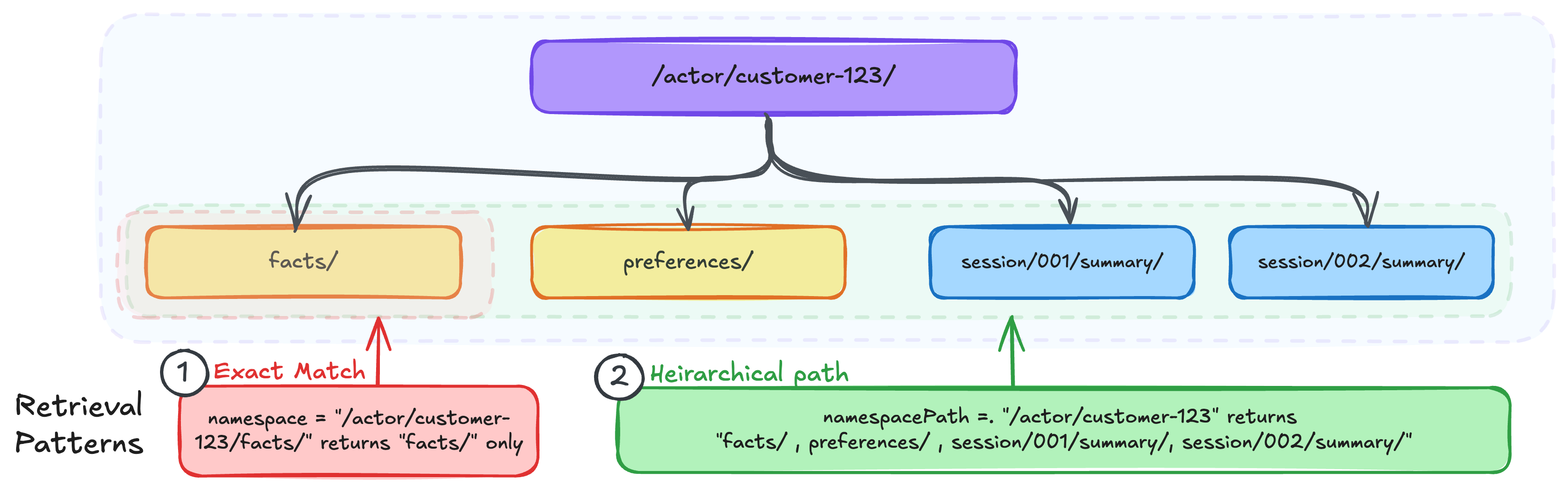
#### 1. namespace — Exact match
The namespace field performs an exact match. It returns only memory records stored at that precise namespace path.
# Returns ONLY records stored at /actor/customer-123/facts/
records = agentcore_client.retrieve_memory_records(
    memoryId="mem-12345abcdef",
    namespace="/actor/customer-123/facts/",
    searchCriteria={
        "searchQuery": "cloud migration",
        "topK": 5
    }
)
CSS
This is the right choice when you know exactly which namespace you want to query and need precise scoping. For example, retrieving only a user’s preferences without pulling in their facts or summaries.
#### 2. namespacePath — Hierarchical retrieval
The namespacePath field performs a hierarchical match, returning the memory records whose namespace falls under the specified path.
# Returns records from
# /actor/customer-123/facts/,
# /actor/customer-123/preferences/,
# /actor/customer-123/session/*/summary/, etc.
records = agentcore_client.retrieve_memory_records(
    memoryId="mem-12345abcdef",
    namespacePath="/actor/customer-123/",
    searchCriteria={
        "searchQuery": "cloud migration",
        "topK": 5
    }
)
Python
This is useful when you want to search across the user’s memories regardless of type, or when building features like “show me everything we know about this customer.” Note that it’s important that you think through your isolation and retrieval patterns to make sure that tree traversal doesn’t expose unintended data.
When to use which
Scenario API Field Example 1 Retrieve semantically relevant user preferences RetrieveMemoryRecords namespace/actor/customer-123/preferences/ 2 Retrieve a specific session summary ListMemoryRecords namespace/actor/customer-123/session/session-001/summary/ 3 List all preferences for a user ListMemoryRecords namespace/actor/customer-123/preferences/ 4 Search across a user’s memories RetrieveMemoryRecords namespacePath/actor/customer-123/ 5 List summaries across sessions for a user ListMemoryRecords namespacePath/actor/customer-123/session/
Writing IAM policies for namespace access control
Namespaces integrate with AWS Identity and Access Management (IAM) through condition keys that restrict which namespaces a principal can include in their Memory API requests.
#### 1. Exact match policies
Use StringEquals with the bedrock-agentcore:namespace condition key to restrict access to a specific namespace:
{
  "Version": "2012-10-17",
  "Statement": [
    {
      "Effect": "Allow",
      "Action": [
        "bedrock-agentcore:RetrieveMemoryRecords",
        "bedrock-agentcore:ListMemoryRecords"
      ],
      "Resource": "arn:aws:bedrock-agentcore:us-east-1:123456789012:memory/mem-12345abcdef",
      "Condition": {
        "StringEquals": {
          "bedrock-agentcore:namespace": "/actor/${aws:PrincipalTag/userId}/preferences/"
        }
      }
    }
  ]
}
CSS
This policy makes sure that a user can only retrieve memories from their own preferences namespace, using the userId principal tag (injected) for dynamic scoping.
#### 2. Hierarchical retrieval policies
Use StringLike with the bedrock-agentcore:namespacePath condition key for hierarchical access:
{
  "Version": "2012-10-17",
  "Statement": [
    {
      "Effect": "Allow",
      "Action": [
        "bedrock-agentcore:RetrieveMemoryRecords",
        "bedrock-agentcore:ListMemoryRecords"
      ],
      "Resource": "arn:aws:bedrock-agentcore:us-east-1:123456789012:memory/mem-12345abcdef",
      "Condition": {
        "StringLike": {
          "bedrock-agentcore:namespacePath": "/actor/${aws:PrincipalTag/userId}/*"
        }
      }
    }
  ]
}
CSS
With this, a user can perform hierarchical retrieval across their namespaces (facts, preferences, summaries) while helping prevent access to other users’ data.
Conclusion
Namespace design is foundational to building effective memory systems with AgentCore Memory. Much like designing a key schema for a database or a prefix structure in object storage, thinking through your access patterns upfront helps you create a namespace hierarchy that supports precise retrieval, clean isolation between users, and IAM-based access control.The key takeaways:
- Think through your access patterns and isolation boundaries before coming up with namespace templates
- Scope semantic and preference memories to the actor (
/actor/{actorId}/) for cross-session consolidation - Scope summaries to the session (
/actor/{actorId}/session/{sessionId}/) since they’re conversation-specific (where needed such as summaries or episodes) - Use
namespacefor exact match when you know the precise path, andnamespacePathfor hierarchical retrieval when you need to search across a subtree - Use leading and trailing slashes in namespace paths to keep them consistent and help prevent prefix collisions
- Use IAM condition keys (
bedrock-agentcore:namespaceandbedrock-agentcore:namespacePath) to control what namespaces can be requested
To get started, visit the following resources:
- AgentCore Memory Organization Documentation
- Agentcore Memory: Long term memory organization documentation
- AWS Samples GitHub Repository
- * *