Stop Hunting Bugs: Meet the New Visual Studio Debugger Agent Workflow

TL;DR · AI 摘要
Visual Studio 推出 Debugger Agent 工作流,通过智能代理自动复现和诊断崩溃与异常,减少手动调试负担。
核心要点
- Debugger Agent 可自动复现崩溃场景并生成诊断报告
- 支持从遥测或用户反馈中提取上下文启动调试会话
- 目标是将被动 bug 追查转变为主动自动化诊断流程
Stop Hunting Bugs: Meet the New Visual Studio Debugger Agent Workflow - Visual Studio Blog
[Skip to main content](javascript:void(0))

Dev Blogs
Dev Blogs
* Developer
- Microsoft for Developers
- Visual Studio
- Visual Studio Code
- Develop from the cloud
- All things Azure
- Xcode
- DevOps
- Windows Developer
- ISE Developer
- Azure SDK
- Command Line
- Aspire
* Technology
* Languages
* .NET
* Platform Development
- #ifdef Windows
- Microsoft Foundry
- Azure Government
- Azure VM Runtime Team
- Bing Dev Center
- Microsoft Edge Dev
- Microsoft Azure
- Microsoft 365 Developer
- Microsoft Entra Identity Developer
- Old New Thing
- Power Platform
* Data Development
- More
Search Search
- No results
Cancel
- Dev Blogs
- Visual Studio Blog
- Stop Hunting Bugs: Meet the New Visual Studio Debugger Agent Workflow
April 15th, 2026

 2 reactions
Stop Hunting Bugs: Meet the New Visual Studio Debugger Agent Workflow

Product Manager
[Show more](javascript:)
We’ve all been there: a bug report lands in your inbox with a title like _“App crashes sometimes”_ and zero reproduction steps. Your morning, which was supposed to be spent building new features, is now a forensic investigation.You’re setting scattershot breakpoints, staring at the call stack, and trying to guess what the original reporter was thinking.
Debugging isn’t just about fixing code;it’s aboutreducing uncertainty. Today, we’re taking a massive leap toward solving that problem by introducing a new, upgraded, guided workflow within our exiting Debugger Agentin Visual Studio.
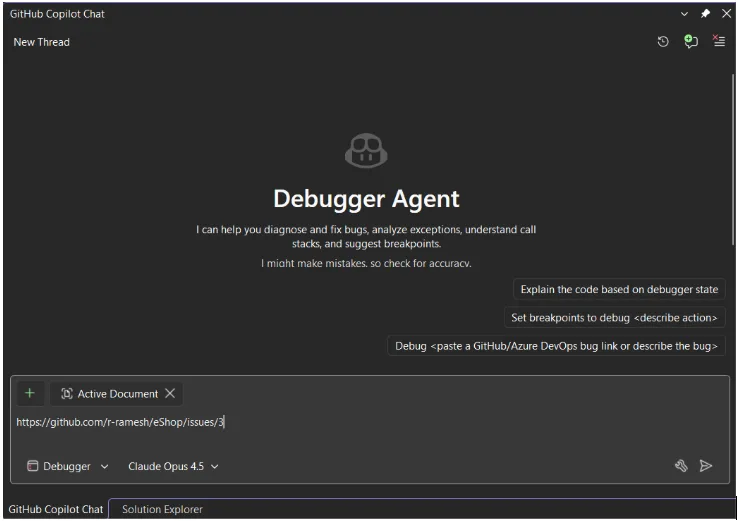
**Ending the “Guessing Game” with a Guided Debugger Loop**
Let’s be honest: traditional debugging is full of friction. You manually parse a vague report, hunt for the right file, and spend twenty minutes just trying to see if you’re in the right ballpark. This new workflow flips the script, transforming theDebugger Agentfrom a chatbot into an interactive partner plugged directly into yourlive runtime.
To get started, simply open your solution in Visual Studio, switch toDebuggermode in Copilot Chat, and point it to the problem with a GitHub/ADO URL or a quick sentence like:
_“The app crashes when saving a file.”_
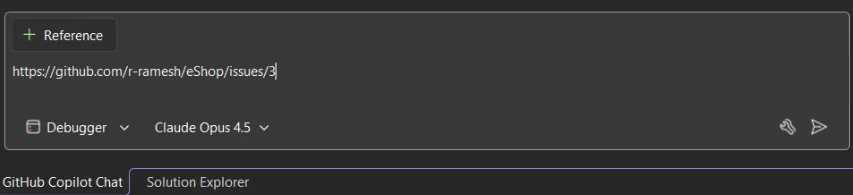
The workflow isinteractive and powered by runtime debugging,meaning the Agent doesn’t just read your code; it feels how it’s running. It immediately builds a mental model of the failure and walks you through a structured, real-time process:
- Hypothesis & Preparation:The Agent analyzes the issue and proposes a root cause. If the reasoning looks solid, it sets intelligent breakpoints and prepares to launch your project.
_Note: If your project can’t be started automatically, just manually start your code, attach the debugger, and tell the Agent you’re ready._
- Active Reproduction:The Agent stays “on the line” while you trigger the bug, watching the runtime state as you move through the repro steps.
- Real-Time Validation:As breakpoints hit, the Agent evaluates variables and the call stack to systematically confirm its hypothesis or eliminate potential causes.
- The Final Fix:Once the root cause is isolated, the Agent proposes a solution. If you approve, it applies the fix and reruns the session to validate the resolution.
This iterative flow is designed to keep you “in the zone.” By handling the manual setup and state analysis, the Agent lets you move from a bug report to a verified fix with significantly less mental context switching.
**Our Vision: Foundational Quality and Beyond**
18.5 GA releases deliver the foundational experience of the guided workflow, specifically optimized for high-value, reproducible scenarios likeexceptions, logic inconsistencies, and state corruption.
As we look forward, we are already evolving this foundation to be even more robust. Our goal is to progressively automate the end-to-end workflow, maturing the Debugger Agent into a comprehensive, seamless debugging companion that anticipates your needs.
**Debug Smarter, Not Harder**
The new workflow in the Debugger Agent represents a fundamental shift in how we think about IDEs.We’re excited to see how you use this in your own workflows whether you’re untangling a complex race condition in a multi-threaded service or simply trying to figure out why a UI element isn’t updating as expected.
Stay connected with the Visual Studio team by following us onTwitter @VS_Debugger,Twitter @VisualStudio, YouTube, andLinkedIn.
[2](https://devblogs.microsoft.com/visualstudio/wp-login.php?redirect_to=https%3A%2F%2Fdevblogs.microsoft.com%2Fvisualstudio%2Fstop-hunting-bugs-meet-the-new-visual-studio-debugger-agent%2F "Sign in to react")
[3](http://devblogs.microsoft.com/visualstudio/stop-hunting-bugs-meet-the-new-visual-studio-debugger-agent/#comments "Go to comments section")
4
- 
- [Share on X](https://twitter.com/intent/tweet?url=https://devblogs.microsoft.com/visualstudio/stop-hunting-bugs-meet-the-new-visual-studio-debugger-agent/&text=Stop%20Hunting%20Bugs:%20Meet%20the%20New%20Visual%20Studio%20Debugger%20Agent%20Workflow "Share on X")
- 
Category
Share
- [](https://www.facebook.com/sharer/sharer.php?u=https://devblogs.microsoft.com/visualstudio/stop-hunting-bugs-meet-the-new-visual-studio-debugger-agent/)
- [](https://twitter.com/intent/tweet?url=https://devblogs.microsoft.com/visualstudio/stop-hunting-bugs-meet-the-new-visual-studio-debugger-agent/&text=Stop%20Hunting%20Bugs:%20Meet%20the%20New%20Visual%20Studio%20Debugger%20Agent%20Workflow)
- [](https://www.linkedin.com/shareArticle?mini=true&url=https://devblogs.microsoft.com/visualstudio/stop-hunting-bugs-meet-the-new-visual-studio-debugger-agent/)
Author
Product Manager
Harshada Hole is a Product Manager on the Visual Studio Debugging and Profiling Team, dedicated to enhancing the diagnostics experience by making it more productive and efficient for developers.
3 comments
Join the discussion.
[Leave a comment](javascript:void(0) "Leave a comment")[Cancel reply](http://devblogs.microsoft.com/visualstudio/stop-hunting-bugs-meet-the-new-visual-studio-debugger-agent/#respond)
Sort by :
Newest
[Newest](javascript:void(0))[Popular](javascript:void(0))[Oldest](javascript:void(0))
 Abhas Bhattacharya April 15, 2026 0 Collapse this comment Copy link When for vscode? The existing debugmcp is broken and has seen no updates for a few months.
Also is this via ADP? Works for all languages? Log in to Vote or Reply
 Clark Abbey 16 hours ago 0 Collapse this comment Copy link Really? no, really? we will have no new updates or features this month? one post after another with things already implemented months/years ago, no relevancy, I wonder in 1 year who will still be using Visual Studio. Log in to Vote or Reply
- Harshada Hole 16 hours ago 0 Collapse this comment Copy link I totally get wanting to see what’s fresh. To clarify, the specific workflow in this blog moving from an issue description to a validated fix via agentic loops is a new addition to our exiting Debugger agent. Log in to Vote or Reply
Read next
April 7, 2026
[Take full control of your floating windows in Visual Studio](https://devblogs.microsoft.com/visualstudio/take-full-control-of-your-floating-windows-in-visual-studio/)

Mads Kristensen
April 15, 2026
[Azure MCP tools now ship built into Visual Studio 2022 — no extension required](https://devblogs.microsoft.com/visualstudio/azure-mcp-tools-now-ship-built-into-visual-studio-2022-no-extension-required/)

Yun Jung Choi
Stay informed
Get notified when new posts are published.
Email *
Country/Region *
I would like to receive the Visual Studio Blog Newsletter. Privacy Statement.
Subscribe
Follow this blog
- 
- [](https://twitter.com/VisualStudio "twitter")
- 
- 
- 
- 
- [](https://devblogs.microsoft.com/visualstudio/feed/ "RSS Feed")
Are you sure you wish to delete this comment?
OK Cancel
Theme
Insert/edit link
Close
Enter the destination URL
URL
Link Text
- [x] Open link in a new tab
Or link to existing content
Search
_No search term specified. Showing recent items._ _Search or use up and down arrow keys to select an item._
Cancel
##### Code Block
×
Paste your code snippet
Ok Cancel
What's new
- Surface Pro
- Surface Laptop
- Surface Laptop Studio 2
- Copilot for organizations
- Copilot for personal use
- AI in Windows
- Explore Microsoft products
- Windows 11 apps
Microsoft Store
- Account profile
- Download Center
- Microsoft Store support
- Returns
- Order tracking
- Certified Refurbished
- Microsoft Store Promise
- Flexible Payments
Education
- Microsoft in education
- Devices for education
- Microsoft Teams for Education
- Microsoft 365 Education
- How to buy for your school
- Educator training and development
- Deals for students and parents
- AI for education
Business
- Microsoft AI
- Microsoft Security
- Dynamics 365
- Microsoft 365
- Microsoft Power Platform
- Microsoft Teams
- Microsoft 365 Copilot
- Small Business
Developer & IT
- Azure
- Microsoft Developer
- Microsoft Learn
- Support for AI marketplace apps
- Microsoft Tech Community
- Microsoft Marketplace
- Marketplace Rewards
- Visual Studio
Company
- Careers
- About Microsoft
- Company news
- Privacy at Microsoft
- Investors
- Diversity and inclusion
- Accessibility
- Sustainability
Your Privacy ChoicesConsumer Health Privacy
- Sitemap
- Contact Microsoft
- Privacy
- Manage cookies
- Terms of use
- Trademarks
- Safety & eco
- Recycling
- About our ads
- © Microsoft 2026
[](http://devblogs.microsoft.com/visualstudio/stop-hunting-bugs-meet-the-new-visual-studio-debugger-agent/#page "Back to top")