How to Analyze Hugging Face for Arm64 Readiness

TL;DR · AI 摘要
文章标题提及分析 Hugging Face 对 Arm64 的支持,但正文内容缺失,仅含 Docker 产品推广信息。
核心要点
- 原文正文内容未实际提供技术分析过程
- 页面主要展示 Docker AI 相关产品和资源链接
- 缺乏关于 Hugging Face 或 Arm64 架构的具体技术细节
How to Analyze Hugging Face for Arm64 Readiness | Docker
Insights on the state of AI agents from 800+ builders and leaders. Download your copy
✕
[](http://www.docker.com/)
- AI
AI
- Docker for AI Simplifying Agent Development
- Docker MCP Catalog and Toolkit Connect and manage MCP tools
- Docker Model Runner Local-first LLM inference made easy
- Docker Sandboxes New Isolated environments for coding agents
More resources for developers

Products
- Docker Hardened Images New Ship with secure, enterprise-ready images
- Docker Desktop Containerize your applications
- Docker Hub Discover and share container images
- Docker Scout Simplify the software supply chain
- Docker Build Cloud Speed up your image builds
- Testcontainers Desktop Local testing with real dependencies
- Testcontainers Cloud Test without limits in the cloud
- Docker MCP Catalog and Toolkit New Connect and manage MCP tools
- Docker Offload Break free of local constraints

- Developers
Developers
- Documentation Find guides for Docker products
- Getting Started Learn the Docker basics
- Resources Search a library of helpful materials
- Training Skill up your Docker knowledge
- Extensions SDK Create and share your own extensions
- Community Connect with other Docker developers
- Open Source Explore open source projects
- Preview Program Help shape the future of Docker
- Customer Stories Get inspired with customer stories
More resources for developers

Company
- About Us Let us introduce ourselves
- What is a Container? Learn about containerization
- Why Docker Discover what makes us different
- Trust Find our customer trust resources
- Partners Become a Docker partner
- Customer Success Learn how you can succeed with Docker
- Events Attend live and virtual meet ups
- Docker Store Gear up with exclusive SWAG
- Careers Apply to join our team
- Contact Us We’d love to hear from you

Search
Toggle menu
How to Analyze Hugging Face for Arm64 Readiness
Posted Apr 13, 2026

_This post is a collaboration between Docker and Arm, demonstrating how Docker MCP Toolkit and the Arm MCP Server work together to scan Hugging Face Spaces for Arm64 Readiness._
In our previous post, we walked through migrating a legacy C++ application with AVX2 intrinsics to Arm64 using Docker MCP Toolkitand the Arm MCP Server – code conversion, SIMD intrinsic rewrites, compiler flag changes, the full stack. This post is about a different and far more common failure mode.
When we tried to run ACE-Step v1.5, a 3.5B parameter music generation model from Hugging Face, on an Arm64 MacBook, the installation failed not with a cryptic kernel error but with a pip error. The flash-attn wheel in requirements.txt was hardcoded to a linux_x86_64 URL, no Arm64 wheel existed at that address, and the container would not build. It’s a deceptively simple problem that turns out to affect roughly 80% of Hugging Face Docker Spaces: not the code, not the Dockerfile, but a single hardcoded dependency URL that nobody noticed because nobody had tested on Arm.
To diagnose this systematically, we built a 7-tool MCP chain that can analyse any Hugging Face Space for Arm64 readiness in about 15 minutes. By the end of this guide you’ll understand exactly why ACE-Step v1.5 fails on Arm64, what the two specific blockers are, and how the chain surfaces them automatically.
**Why Hugging Face Spaces Matter for Arm**
Hugging Face hosts over one million Spaces, a significant portion of which use the Docker SDK meaning developers write a Dockerfile and HuggingFace builds and serves the container directly. The problem is that nearly all of those containers were built and tested exclusively on linux/amd64, which creates a deployment wall for three fast-growing Arm64 targets that are increasingly relevant for AI workloads.
| Target | Hardware | Why it matters | | --- | --- | --- | | Target Cloud | Hardware AWS Graviton, Azure Cobalt, Google Axion | Why it matters 20-40% cost reduction vs. x86 | | Target Edge/Robotics | Hardware NVIDIA Jetson Thor, DGX Spark | Why it matters GR00T, LeRobot, Isaac all target Arm64 | | Target Local dev | Hardware Apple Silicon M1-M4 | Why it matters Most popular developer machine, zero cloud cost |
The failure mode isn’t always obvious, and it tends to show up in one of two distinct patterns. The first is a missing container manifest – the image has no arm64 layer and Docker refuses to pull it, which is at least straightforward to diagnose. The second is harder to catch: the Dockerfile and base image are perfectly fine, but a dependency in requirements.txt points to a platform-specific wheel URL. The build starts, reaches pip install, and fails with a platform mismatch error that gives no clear indication of where to look. ACE-Step v1.5 is a textbook example of the second pattern, and the MCP chain catches both in minutes.
**The 7-Tool MCP Chain**
Docker MCP Toolkit orchestrates the analysis through a secure MCP Gateway. Each tool runs in an isolated Docker container. The seven tools in the chain are:

_Caption: The 7-tool MCP chain architecture diagram_
The tools:
- Hugging Face MCP – Discovers the Space, identifies SDK type (Docker vs. Gradio)
- Skopeo (via Arm MCP Server) – Inspects the container registry, reports supported architectures
- migrate-ease (via Arm MCP Server) – Scans source code for x86-specific intrinsics, hardcoded paths, arch-locked libraries
- GitHub MCP – Reads
Dockerfile,pyproject.toml,requirements.txtfrom the repository - Arm Knowledge Base (via Arm MCP Server) – Searches learn.arm.com for build strategies and optimization guides
- Sequential Thinking – Combines findings into a structured migration verdict
- Docker MCP Gateway – Routes requests, manages container lifecycle
The natural question at this point is whether you could simply rebuild your Docker image for Arm64 and be done with it and for many applications, you could. But knowing in advance whether the rebuild will actually succeed is a different problem. Your Dockerfile might depend on a base image that doesn’t publish Arm64 builds. Your Python dependencies might not have aarch64 wheels. Your code might use x86-specific system calls. The MCP chain checks all of this automatically before you invest time in a build that may not work.
**Setting Up Visual Studio Code with Docker MCP Toolkit**
**Prerequisites**
Before you begin, make sure you have:
- A machine with 8 GB RAM minimum (16GB recommended)
- The latest Docker Desktop release
- VS Code with GitHub Copilot extension
- GitHub account with personal access token
**Step 1. Enable Docker MCP Toolkit**
Open Docker Desktop and enable the MCP Toolkit from Settings.
To enable:
- Open Docker Desktop
- Go to Settings>Beta Features

_Caption: Enabling Docker MCP Toolkit under Docker Desktop_
- Toggle Docker MCP Toolkit ON
- Click Apply
**Step 2. Add Required MCP Servers from Catalog**
Add the following four MCP Servers from the Catalog. You can find them by selecting “Catalog” in the Docker Desktop MCP Toolkit, or by following these links:
- **Arm MCP Server** – Architecture analysis,
migrate-easescanning,skopeoinspection, and Arm knowledge base - **GitHub MCP Server** – Repository analysis, code reading, and pull request creation
- **Sequential Thinking MCP Server** – Complex problem decomposition and planning
- **Hugging Face MCP Server** – Space discovery and metadata retrieval

_Caption: Searching for Arm MCP Server in the Docker MCP Catalog_
**Step 3. Configure the Servers**
- Configure the Arm MCP Server
To access your local code for the migrate-ease scan and MCA tools, the Arm MCP Server needs a directory configured to point to your local code.

_Caption: Arm MCP Server configuration_
Once you click ‘Save’, the Arm MCP Server will know where to look for your code. If you want to give a different directory access in the future, you’ll need to change this path.
Available Arm Migration Tools
Click Tools to view all six MCP tools available under Arm MCP Server:

_Caption: List of MCP tools provided by the Arm MCP Server_
knowledge_base_search– Semantic search of Arm learning resources, intrinsics documentation, and software compatibilitymigrate_ease_scan– Code scanner supporting C++, Python, Go, JavaScript, and Java for Arm compatibility analysischeck_image– Docker image architecture verification (checks if images support Arm64)skopeo– Remote container image inspection without downloadingmca– Machine Code Analyzer for assembly performance analysis and IPC predictionssysreport_instructions– System architecture information gathering
- Configure the GitHub MCP Server
The GitHub MCP Server lets GitHub Copilot read repositories, create pull requests, manage issues, and commit changes.

_Caption: Steps to configure GitHub Official MCP Server_
Configure Authentication:
- Select GitHub official
- Choose your preferred authentication method
- For Personal Access Token, get the token from GitHub > Settings > Developer Settings

_Caption: Setting up Personal Access Token in GitHub MCP Server_
- Configure the Sequential Thinking MCP Server
- Click “Sequential Thinking”
- No configuration needed

_Caption: Sequential MCP Server requires zero configuration_
This server helps GitHub Copilot break down complex migration decisions into logical steps.
- Configure the Hugging Face MCP Server
The Hugging Face MCP Server provides access to Space metadata, model information, and repository contents directly from the Hugging Face Hub.
- Click “Hugging Face”
- No additional configuration needed for public Spaces
- For private Spaces, add your HuggingFace API token
**Step 4. Add the Servers to VS Code**
The Docker MCP Toolkit makes it incredibly easy to configure MCP servers for clients like VS Code.
To configure, click “Clients” and scroll down to Visual Studio Code. Click the “Connect” button:

_Caption: Setting up Visual Studio Code as MCP Client_
Now open VS Code and click on the ‘Extensions’ icon in the left toolbar:

_Caption: Configuring MCP\_DOCKER under VS Code Extensions_
Click the MCP_DOCKER gear, and click ‘Start Server’:

_Caption: Starting MCP Server under VS Code_
**Step 5. Verify Connection**
Open GitHub Copilot Chat in VS Code and ask:
What Arm migration and Hugging Face tools do you have access to?
You should see tools from all four servers listed. If you see them, your connection works. Let’s scan a Hugging Face Space.

_Caption: Playing around with GitHub Copilot_

**Real-World Demo: Scanning ACE-Step v1.5**
Now that you’ve connected GitHub Copilot to Docker MCP Toolkit, let’s scan a real Hugging Face Space for Arm64 readiness and uncover the exact Arm64 blocker we hit when trying to run it locally.
- Target:ACE-Step v1.5 – a 3.5B parameter music generation model
- Time to scan: 15 minutes
- Infrastructure cost: $0 (all tools run locally in Docker containers)
**The Workflow**
Docker MCP Toolkit orchestrates the scan through a secure MCP Gateway that routes requests to specialized tools: the Arm MCP Server inspects images and scans code, Hugging Face MCP discovers the Space, GitHub MCP reads the repository, and Sequential Thinking synthesizes the verdict.
Step 1. Give GitHub Copilot Scan Instructions
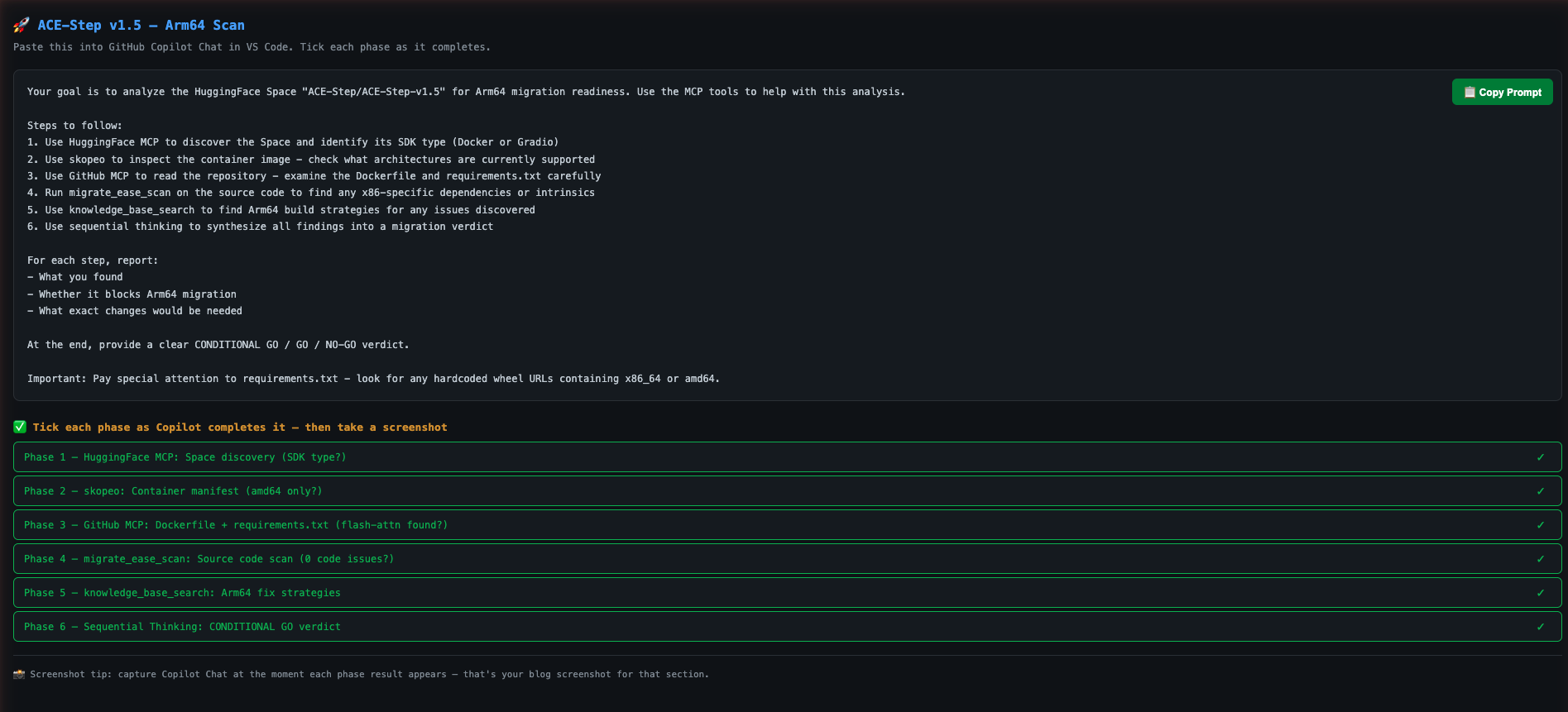
Open your project in VS Code. In GitHub Copilot Chat, paste this prompt:
Your goal is to analyze the Hugging Face Space "ACE-Step/ACE-Step-v1.5" for Arm64 migration readiness. Use the MCP tools to help with this analysis.
Steps to follow:
1. Use Hugging Face MCP to discover the Space and identify its SDK type (Docker or Gradio)
2. Use skopeo to inspect the container image - check what architectures are currently supported
3. Use GitHub MCP to read the repository - examine pyproject.toml, Dockerfile, and requirements
4. Run migrate_ease_scan on the source code to find any x86-specific dependencies or intrinsics
5. Use knowledge_base_search to find Arm64 build strategies for any issues discovered
6. Use sequential thinking to synthesize all findings into a migration verdict
At the end, provide a clear GO / NO-GO verdict with a summary of required changes.
Step 2. Watch Docker MCP Toolkit Execute
GitHub Copilot orchestrates the scan using Docker MCP Toolkit. Here’s what happens:
Phase 1: Space Discovery
GitHub Copilot starts by querying the Hugging Face MCP server to retrieve Space metadata.

_Caption: GitHub Copilot uses Hugging Face MCP to discover the Space and identify its SDK type._
The tool returns that ACE-Step v1.5 uses the Docker SDK – meaning Hugging Face serves it as a pre-built container image, not a Gradio app. This is critical: Docker SDK Spaces have Dockerfiles we can analyze and rebuild, while Gradio SDK Spaces are built by Hugging Face’s infrastructure we can’t control.
Phase 2: Container Image Inspection
Next, Copilot uses the Arm MCP Server’s skopeo tool to inspect the container image without downloading it.

_Caption: The skopeo tool reports that the container image has no Arm64 build available. The container won’t start on Arm hardware._
Result: the manifest includes only linux/amd64. No Arm64 build exists. This is the first concrete data point the container will fail on any Arm hardware. But this is not the full story.
Phase 3: Source Code Analysis
Copilot uses GitHub MCP to read the repository’s key files. Here is the actual Dockerfile from the Space:
FROM python:3.11-slim
ENV PYTHONDONTWRITEBYTECODE=1 \
`RUN apt-get update && \`
RUN useradd -m -u 1000 user
RUN mkdir -p /data && chown user:user /data && chmod 755 /data
ENV HOME=/home/user \
`WORKDIR $HOME/app`

`COPY --chown=user:user requirements.txt .`

`COPY --chown=user:user acestep/third_parts/nano-vllm ./acestep/third_parts/nano-vllm`

`USER user`

`RUN pip install --no-cache-dir --user -r requirements.txt`

`RUN pip install --no-deps ./acestep/third_parts/nano-vllm`

`COPY --chown=user:user . .`

`EXPOSE 7860`

`CMD ["python", "app.py"]`

The Dockerfile itself looks clean:

*   python:3.11-slim already publishes multi-arch builds including arm64
*   No -mavx2, no -march=x86-64 compiler flags
*   build-essential, ffmpeg, libsndfile1 are all available in Debian’s arm64 repositories

But the real problem is in `requirements.txt`. This is what I hit when I tried to install ACE-Step locally:

`# nano-vllm dependencies`

`triton>=3.0.0; sys_platform != 'win32'`

`flash-attn @ https://github.com/mjun0812/flash-attention-prebuild-wheels/releases/`
**Two immediate blockers:**
* **`flash-attn`** is pinned to a hardcoded `linux_x86_64` wheel URL. On an aarch64 system, pip downloads this wheel and immediately rejects it: _“not a supported wheel on this platform.”_ This is the exact error I hit.
* **`triton>=3.0.0`** has no aarch64 wheel on PyPI for Linux. It will fail on Arm hardware.
Neither of these is a code problem. The Python source code is architecture-neutral. The fix is in the dependency declarations.
**Phase 4: Architecture Compatibility Scan**
Copilot runs the `migrate_ease_scan` tool with the Python scanner on the codebase.
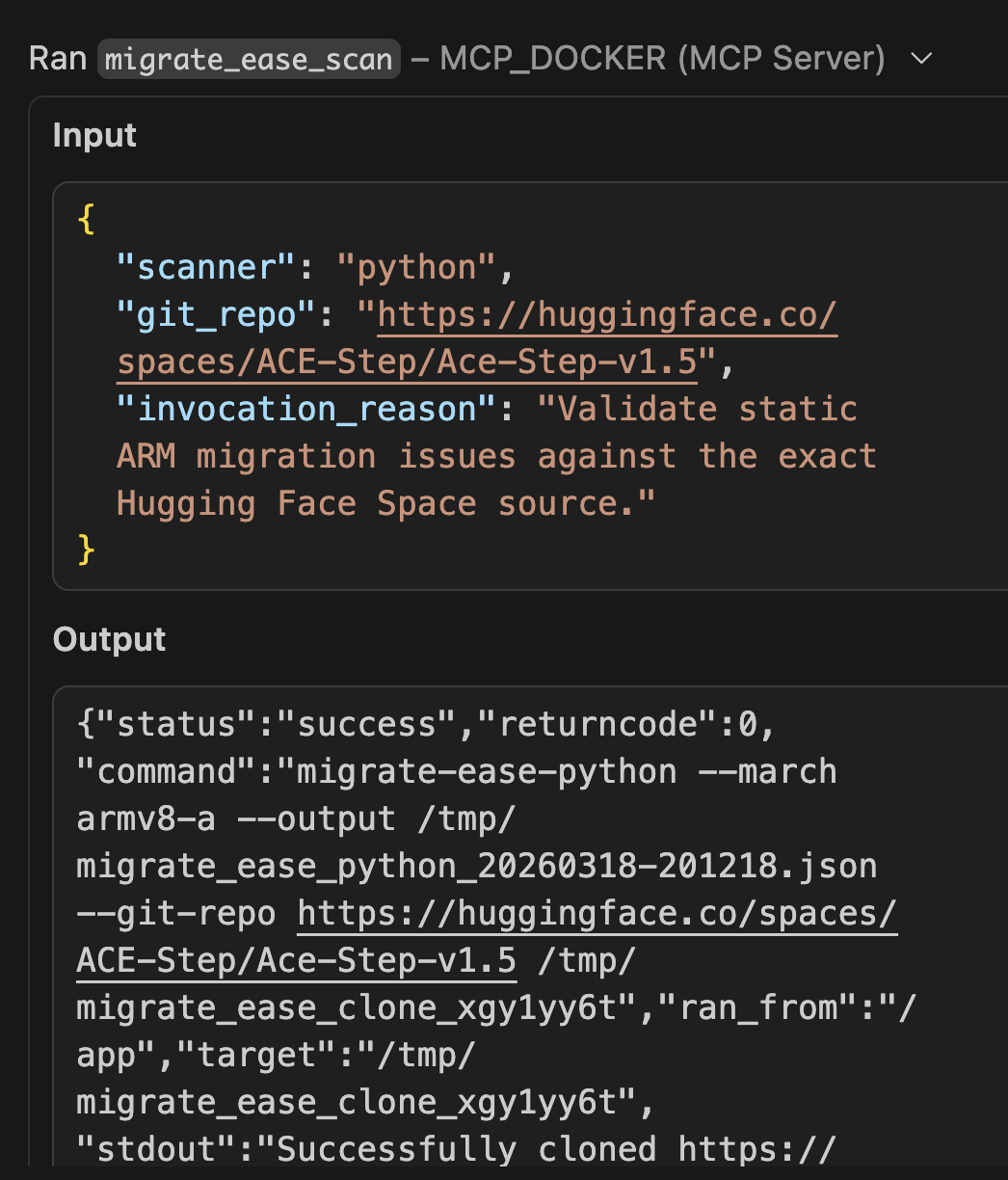
_Caption: The migrate\_ease\_scan tool analyzes the Python source code and finds zero x86-specific dependencies. No intrinsics, no hardcoded paths, no architecture-locked libraries._
The application source code itself returns 0 architecture issues — no x86 intrinsics, no platform-specific system calls. But the scan also flags the dependency manifest. Two blockers in requirements.txt:
| Dependency | Issue | Arm64 Fix |
| --- | --- | --- |
| Dependency flash-attn (linux wheel) | Issue Hardcoded linux_x86_64 URL | Arm64 Fix Use flash-attn 2.7+ via PyPI — publishes aarch64 wheels natively |
| Dependency triton>=3.0.0 | Issue No aarch64 PyPI wheel for Linux | Arm64 Fix Exclude on aarch64 or use triton-nightly aarch64 build |
**Phase 5: Arm Knowledge Base Lookup**
Copilot queries the Arm MCP Server’s knowledge base for solutions to the discovered issues.
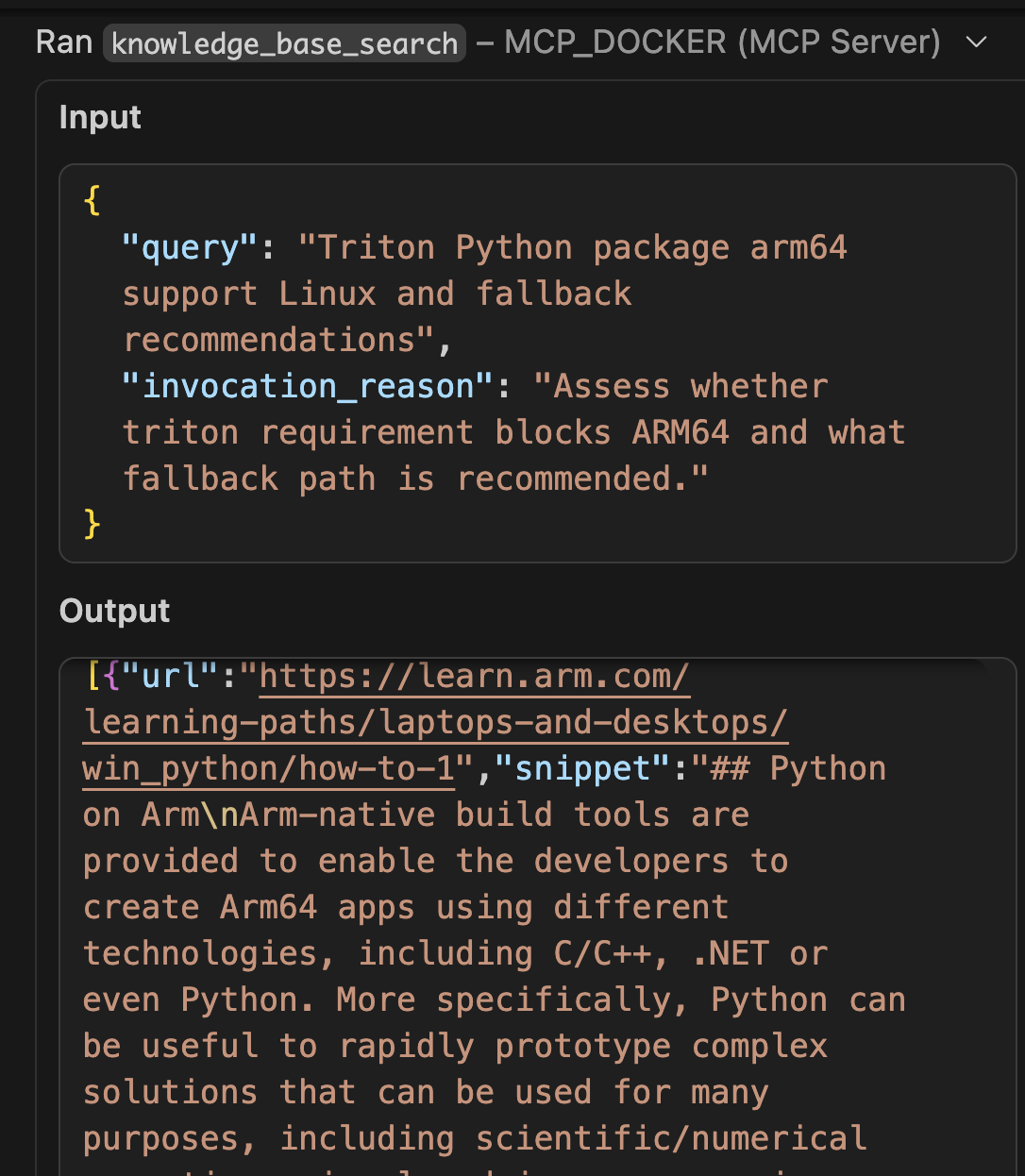
_Caption: GitHub Copilot uses the knowledge\_base\_search tool to find Docker buildx multi-arch strategies from learn.arm.com._
The knowledge base returns documentation on:
* flash-attn aarch64 wheel availability from version 2.7+
* PyTorch Arm64 optimization guides for Graviton and Apple Silicon
* Best practices for CUDA 13.0 on aarch64 (Jetson Thor / DGX Spark)
* triton alternatives for CPU inference paths on Arm
**Phase 6: Synthesis and Verdict**
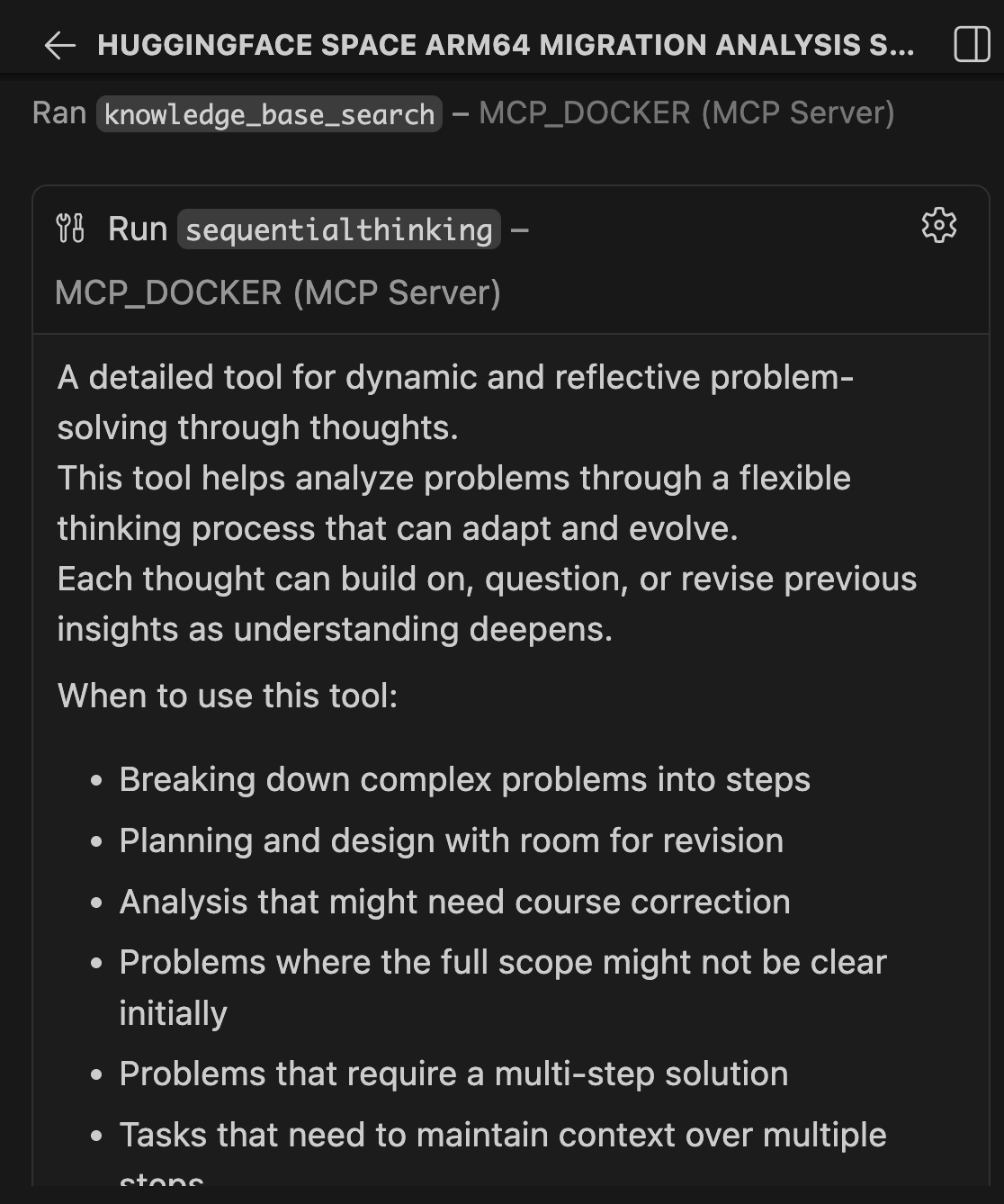
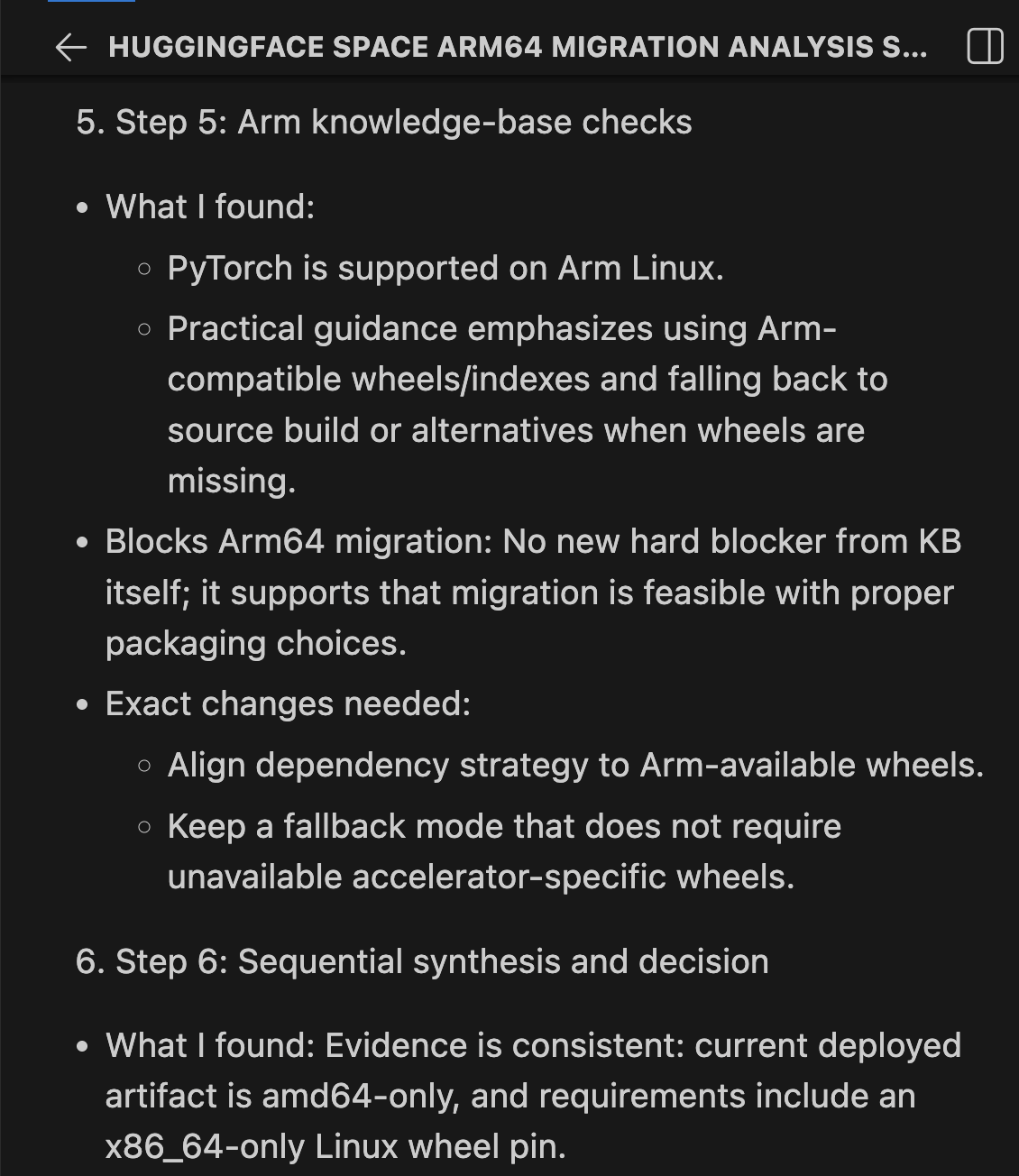
Sequential Thinking combines all findings into a structured verdict:
| Check | Result | Blocks? |
| --- | --- | --- |
| Check Container manifest | Result amd64 only | Blocks? Yes, needs rebuild |
| Check Base image python:3.11-slim | Result Multi-arch (arm64 available) | Blocks? No |
| Check System packages (ffmpeg, libsndfile1) | Result Available in Debian arm64 | Blocks? No |
| Check torch==2.9.1 | Result aarch64 wheels published | Blocks? No |
| Check flash-attn linux wheel | Result Hardcoded linux_x86_64 URL | Blocks? YES, add arm64 URL alongside |
| Check triton>=3.0.0 | Result aarch64 wheels available from 3.5.0+ | Blocks? No, resolves automatically |
| Check Source code (migrate-ease) | Result 0 architecture issues | Blocks? No |
| Check Compiler flags in Dockerfile | Result None x86-specific | Blocks? No |
**Verdict: CONDITIONAL GO**. Zero code changes. Zero Dockerfile changes. One dependency fix is required.
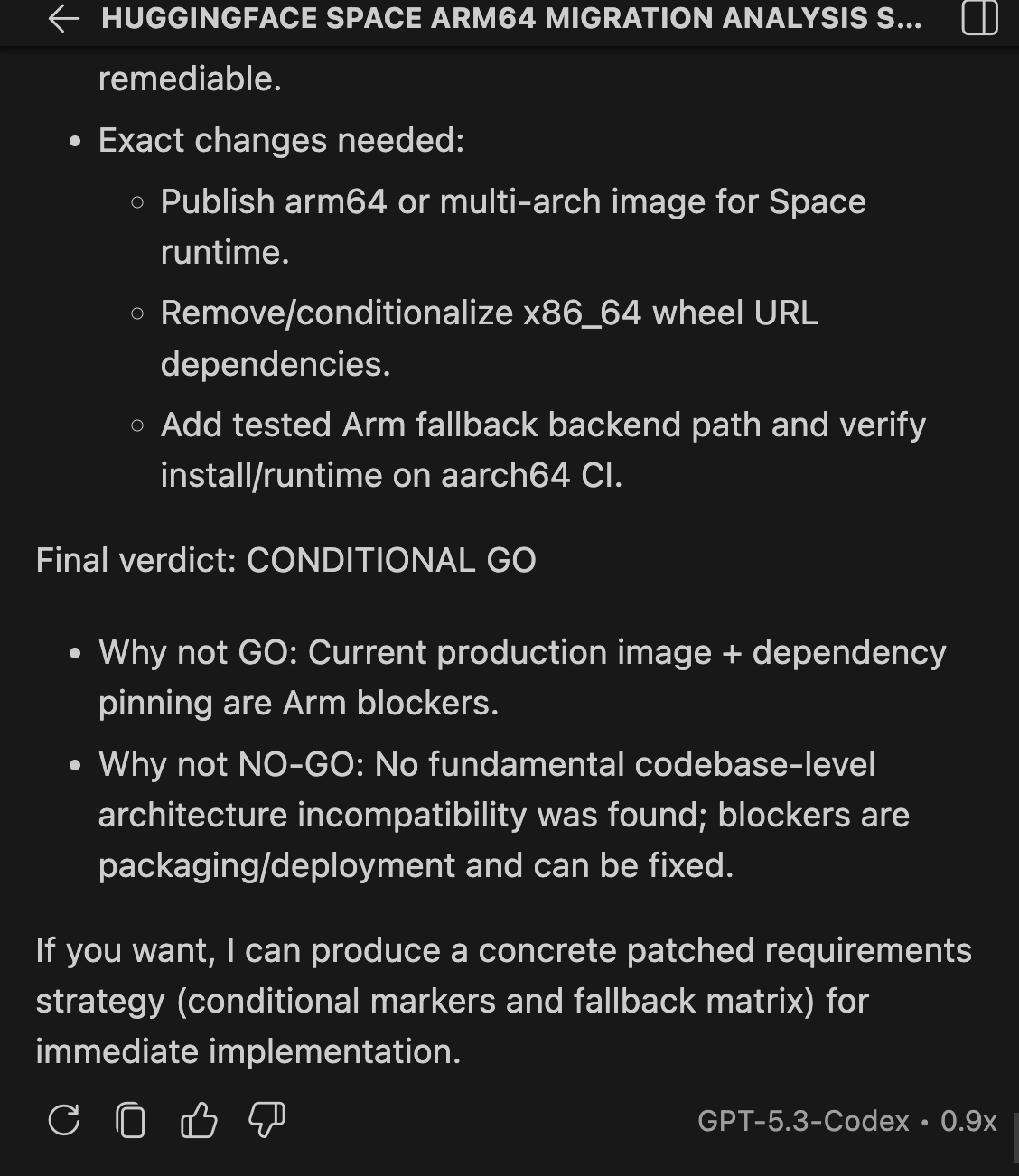
Here are the exact changes needed in requirements.txt:
`# BEFORE — only x86_64`
`flash-attn @ https:``//github``.com``/mjun0812/flash-attention-prebuild-wheels/releases/download/v0``.7.12``/flash_attn-2``.8.3+cu128torch2.10-cp311-cp311-linux_aarch64.whl ; sys_platform ==``'linux'``and python_version ==``'3.11'``and platform_machine ==``'aarch64'`
`# AFTER — add arm64 line alongside x86_64`
`flash-attn @ https:``//github``.com``/mjun0812/flash-attention-prebuild-wheels/releases/download/v0``.7.12``/flash_attn-2``.8.3+cu128torch2.10-cp311-cp311-linux_aarch64.whl ; sys_platform ==``'linux'``and python_version ==``'3.11'``and platform_machine ==``'aarch64'`
`flash-attn @ https:``//github``.com``/mjun0812/flash-attention-prebuild-wheels/releases/download/v0``.7.12``/flash_attn-2``.8.3+cu128torch2.10-cp311-cp311-linux_x86_64.whl ; sys_platform ==``'linux'``and python_version ==``'3.11'``and platform_machine !=``'aarch64'`
`# triton — no change needed, 3.5.0+ has aarch64 wheels, resolves automatically`
`triton>=3.0.0; sys_platform !=``'win32'`
After those two fixes, the build command is:
`docker buildx build --platform linux``/arm64``-t ace-step:arm64 .`
That single command unlocks three deployment paths:
* NVIDIA Arm64 — Jetson Thor, DGX Spark (aarch64 + CUDA 13.0)
* Cloud Arm64 — AWS Graviton, Azure Cobalt, Google Axion (20-40% cost savings)
* Apple Silicon — M1-M4 Macs with MPS acceleration (local inference, $0 cloud cost)
**Phase 7: Create the Pull Request**
After completing the scan, Copilot uses GitHub MCP to propose the fix. Since the only blocker is the hardcoded `linux_x86_64` wheel URL on line 32 of `requirements.txt`, the change is surgical: one line added, nothing removed.
The fix adds the equivalent `linux_aarch64` wheel from the same release alongside the existing x86_64 entry, conditioned on `platform_machine == 'aarch64'`:
`# BEFORE — only x86_64, fails silently on Arm`
`flash-attn @ https:``//github``.com``/mjun0812/flash-attention-prebuild-wheels/releases/`
`# AFTER — add arm64 line alongside, conditioned by platform_machine`

`flash-attn @ https:``//github``.com``/mjun0812/flash-attention-prebuild-wheels/releases/`
`flash-attn @ https:``//github``.com``/mjun0812/flash-attention-prebuild-wheels/releases/`
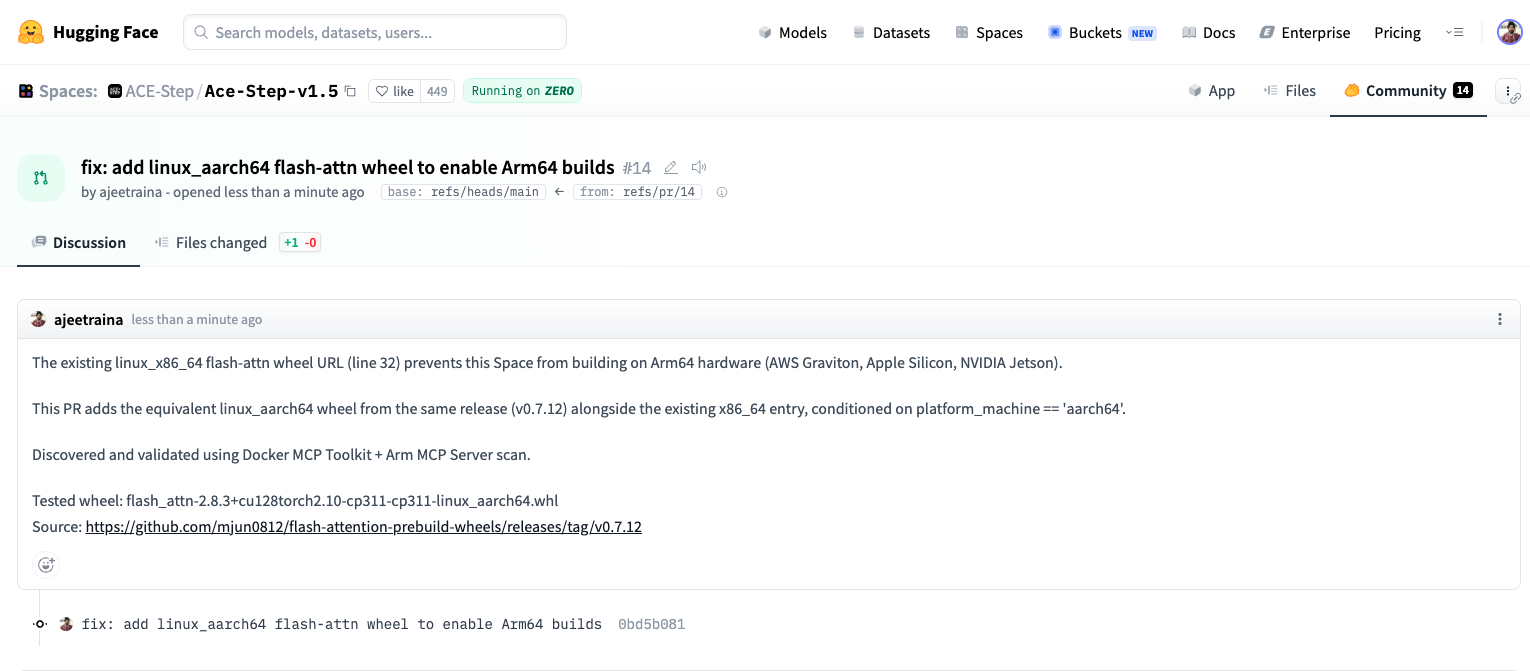
_Caption: PR #14 on Hugging Face – Ready to merge_
The key insight: the upstream maintainer already published the arm64 wheel in the same release. The fix wasn’t a rebuild or a code change – it was adding one line that references an artifact that already existed. The MCP chain found it in 15 minutes. Without it, a developer hitting this pip error would spend hours tracking it down.
**PR:**[](https://github.com/ajeetraina/Ace-Step-v1.5/pull/1)[https://huggingface.co/spaces/ACE-Step/Ace-Step-v1.5/discussions/14](https://huggingface.co/spaces/ACE-Step/Ace-Step-v1.5/discussions/14)
### **Without Arm MCP vs. With Arm MCP**
Let’s be clear about what changes when you add the Arm MCP Server to Docker MCP Toolkit.
* Without Arm MCP: You ask GitHub Copilot to check your Hugging Face Space for Arm64 compatibility. Copilot responds with general advice: “Check if your base image supports arm64”, “Look for x86-specific code”, “Try rebuilding with buildx”. You manually inspect Docker Hub, grep through the codebase, check each dependency on PyPI, and hit a pip install failure you cannot easily diagnose. The flash-attn URL issue alone can take an hour to track down.
* With Arm MCP + Docker MCP Toolkit: You ask the same question. Within minutes, it uses skopeo to verify the base image, runs migrate_ease_scan on your actual codebase, flags the hardcoded linux_x86_64 wheel URLs in requirements.txt, queries knowledge_base_search for the correct fix, and synthesizes a structured CONDITIONAL GO verdict with every check documented.
Real images get inspected. Real code gets scanned. Real dependency files get analyzed. The difference is Docker MCP Toolkit gives GitHub Copilot access to actual Arm migration tooling, not just general knowledge.
### **Manual Process vs. MCP Chain**
**Manual process:**
1. Clone the Hugging Face Space repository (10 minutes)
2. Inspect the container manifest for architecture support (5 minutes)
3. Read through pyproject.toml and requirements.txt (20 minutes)
4. Check PyPI for Arm64 wheel availability across all dependencies (30 minutes)
5. Analyze the Dockerfile for hardcoded architecture assumptions (10 minutes)
6. Research CUDA/cuDNN Arm64 support for the required versions (20 minutes)
7. Write up findings and recommended changes (15 minutes)
**Total: 2-3 hours per Space**
**With Docker MCP Toolkit:**
1. Give GitHub Copilot the scan instructions (5 minutes)
2. Review the migration report (5 minutes)
3. Submit a PR with changes (5 minutes)
**Total: 15 minutes per Space**
## **What This Suggests at Scale**
ACE-Step is a standard Python AI application: PyTorch, Gradio, pip dependencies, a slim Dockerfile. This pattern covers the majority of Docker SDK Spaces on Hugging Face.
The Arm64 wall for these apps is not always visible. The Dockerfile looks clean. The base image supports arm64. The Python code has no intrinsics. But buried in requirements.txt is a hardcoded wheel URL pointing at a linux_x86_64 binary, and nobody finds it until they actually try to run the container on Arm hardware.
That is the 80% problem: **80% of Hugging Face Docker Spaces have never been tested on Arm.** Not because the code will not work. but because nobody checked. The MCP chain is a systematic check that takes 15 minutes instead of an afternoon of debugging pip errors.
That has real cost implications:
* Graviton inference runs 20-40% cheaper for the same workloads. Every amd64-only Space leaves that savings untouched.
* NVIDIA Physical AI (GR00T, LeRobot, Isaac) deploys on Jetson Thor. Developers find models on Hugging Face, but the containers fail to build on target hardware.
* Apple Silicon is the most common developer laptop. Local inference means faster iteration and no cloud bill.
## **How Docker MCP Toolkit Changes Development**
Docker MCP Toolkit changes how developers interact with specialized knowledge and capabilities. Rather than learning new tools, installing dependencies, or managing credentials, developers connect their AI assistant once and immediately access containerized expertise.
The benefits extend beyond Hugging Face scanning:
* **Consistency** — Same 7-tool chain produces the same structured analysis for any container
* **Security** — Each tool runs in an isolated Docker container, preventing tool interference
* **Reproducibility** — Scans behave identically across environments
* **Composability** — Add or swap tools as the ecosystem evolves
* **Discoverability** — Docker MCP Catalog makes finding the right server straightforward
Most importantly, developers remain in their existing workflow. VS Code. GitHub Copilot. Git. No context switching to external tools or dashboards.
## **Wrapping Up**
You have just scanned a real Hugging Face Space for Arm64 readiness using Docker MCP Toolkit, the Arm MCP Server, and GitHub Copilot. What we found with ACE-Step v1.5 is representative of what you will find across Hugging Face: code that is architecture-neutral, a Dockerfile that is already clean, but a requirements.txt with hardcoded x86_64 wheel URLs that silently break Arm64 builds.
The MCP chain surfaces this in 15 minutes. Without it, you are staring at a pip error with no clear path to the cause.
**Ready to try it?** Open [Docker Desktop](https://hub.docker.com/open-desktop?url=https://open.docker.com/dashboard/mcp&_gl) and explore the MCP Catalog. Start with the [Arm MCP Server](https://hub.docker.com/mcp/server/arm-mcp/overview), add [GitHub](https://hub.docker.com/mcp/server/github-official/overview),[Sequential Thinking](https://hub.docker.com/mcp/server/sequentialthinking/overview), and [Hugging Face MCP](https://hub.docker.com/mcp/server/hugging-face/overview). Point the chain at any Hugging Face Space you’re working with and see what comes back.
### **Learn More**
* **New to Docker?**[Download Docker Desktop](https://www.docker.com/products/docker-desktop)
* **Explore the MCP Catalog:**[Discover containerized, security-hardened MCP servers](https://hub.docker.com/mcp)
* **Get Started with MCP Toolkit:**[Official Documentation](https://docs.docker.com/ai/mcp-catalog-and-toolkit/)
* **Arm MCP Server:**[Developer Documentation](https://developer.arm.com/community/arm-community-blogs/b/ai-blog/posts/introducing-the-arm-mcp-server-simplifying-cloud-migration-with-ai)
* **Hugging Face MCP Server:**[](https://huggingface.co/docs/hub/en/mcp-server)[Hub Documentation](https://hub.docker.com/mcp/server/hugging-face/overview)
* **ACE-Step v1.5:**[Hugging Face Space](https://huggingface.co/spaces/ACE-Step/Ace-Step-v1.5)
* **Migration PR:**[GitHub Pull Request](https://github.com/ajeetraina/Ace-Step-v1.5/pull/1)
### About the Authors

[Ajeet Singh Raina](https://www.docker.com/contributors/ajeet-singh-raina/)
Developer Advocate, Docker
Ajeet Singh Raina, Developer Advocate at Docker, writes and speaks on containers, Docker Compose & AI, helping devs build confidently.
[Docker Desktop](https://www.docker.com/blog/tag/docker-desktop/)[MCP server](https://www.docker.com/blog/tag/mcp-server/)[MCP Toolkit](https://www.docker.com/blog/tag/mcp-toolkit/)[Community](https://www.docker.com/blog/category/community-content/)[Engineering](https://www.docker.com/blog/category/engineering/)[Partnerships](https://www.docker.com/blog/category/partnerships/)
Table of contents
[](https://www.linkedin.com/sharing/share-offsite/?url=https%3A%2F%2Fwww.docker.com%2Fblog%2Fhow-to-analyze-hugging-face-for-arm64-readiness%2F "Visit this Linkedin profile")[](https://twitter.com/intent/tweet?url=https%3A%2F%2Fwww.docker.com%2Fblog%2Fhow-to-analyze-hugging-face-for-arm64-readiness%2F "Visit this X profile")[](https://www.facebook.com/sharer/sharer.php?u=https%3A%2F%2Fwww.docker.com%2Fblog%2Fhow-to-analyze-hugging-face-for-arm64-readiness%2F "Visit this Facebook profile")
## Related Posts
* [Mar 31, 2026 #### Docker Sandboxes: Run Agents in YOLO Mode, Safely Agents have crossed a threshold. Over a quarter of all production code is now AI-authored, and developers who use agents are merging roughly 60% more pull requests. But these gains only come when you let agents run autonomously. And to unlock that, you have to get out of the way. That means letting agents run…    Eric Jia, Srini Sekaran, and Timir Karia Read now](https://www.docker.com/blog/docker-sandboxes-run-agents-in-yolo-mode-safely/)
* [Apr 14, 2026 #### Why We Chose the Harder Path: Docker Hardened Images, One Year Later We’re coming up on a year since launching Docker Hardened Images (DHI) this May, and in this blog we celebrate the milestones, talk about our approach, and look at some practices in the industry.  Christian Dupuis Read now](https://www.docker.com/blog/why-we-chose-the-harder-path-docker-hardened-images-one-year-later/)
* [Apr 8, 2026 #### Reclaim Developer Hours through Smarter Vulnerability Prioritization with Docker and Mend.io We recently announced the integration between Mend.io and Docker Hardened Images (DHI) provides a seamless framework for managing container security. By automatically distinguishing between base image vulnerabilities and application-layer risks, it uses VEX statements to differentiate between exploitable vulnerabilities and non-exploitable vulnerabilities, allowing your team to prioritize what really matters. TL;DR: The Developer Value Proposition…   Adam Dawson and Dor Hayun Read now](https://www.docker.com/blog/reclaim-developer-hours-through-smarter-vulnerability-prioritization-with-docker-and-mend-io/)
* [Apr 2, 2026 #### Defending Your Software Supply Chain: What Every Engineering Team Should Do Now The latest supply chain attack wave is not a single incident to respond to. It is a permanent shift in the threat landscape. In this blog by the Docker CISO Mark Lechner, we share the recommended best practice we use to protect ourselves.  Mark Lechner Read now](https://www.docker.com/blog/defending-your-software-supply-chain-what-every-engineering-team-should-do-now/)
## Products
* [Products Overview](http://www.docker.com/products/)
* [Docker Desktop](http://www.docker.com/products/docker-desktop/)
* [Docker Hub](http://www.docker.com/products/docker-hub/)
* [Docker Scout](http://www.docker.com/products/docker-scout/)
* [Docker Build Cloud](http://www.docker.com/products/build-cloud/)
* [Testcontainers Desktop](https://testcontainers.com/desktop/)
* [Testcontainers Cloud](https://testcontainers.com/cloud/)
* [Docker MCP Catalog and Toolkit](http://www.docker.com/products/mcp-catalog-and-toolkit/)
* [Docker Hardened Images](http://www.docker.com/products/hardened-images/)
## Features
* [Command Line Interface](http://www.docker.com/products/cli/)
* [IDE Extensions](http://www.docker.com/products/ide/)
* [Container Runtime](http://www.docker.com/products/container-runtime/)
* [Docker Extensions](http://www.docker.com/products/extensions/)
* [Trusted Open Source Content](http://www.docker.com/products/trusted-content/open-source/)
* [Secure Software Supply Chain](http://www.docker.com/solutions/security/)
## Developers
* [Documentation](https://docs.docker.com/)
* [Getting Started](http://www.docker.com/get-started/)
* [Trainings](http://www.docker.com/resources/trainings)
* [Extensions SDK](http://www.docker.com/developers/sdk/)
* [Community](http://www.docker.com/community/)
* [Open Source](http://www.docker.com/community/open-source/)
* [Preview Program](http://www.docker.com/community/get-involved/developer-preview/)
* [Newsletter](http://www.docker.com/newsletter-subscription/)
## Pricing
* [Personal](http://www.docker.com/products/personal/)
* [Pro](http://www.docker.com/products/pro/)
* [Team](http://www.docker.com/products/team/)
* [Business](http://www.docker.com/products/business/)
* [Premium Support and TAM](http://www.docker.com/pricing/premium-support-tam/)
* [Pricing FAQ](http://www.docker.com/pricing/faq/)
* [Contact Sales](http://www.docker.com/pricing/contact-sales/)
## Company
* [About Us](http://www.docker.com/company/)
* [What is a Container](http://www.docker.com/resources/what-container/)
* [Blog](http://www.docker.com/blog/)
* [Why Docker](http://www.docker.com/why-docker/)
* [Trust](http://www.docker.com/trust/)
* [Customer Success](http://www.docker.com/customer-success/)
* [Partners](http://www.docker.com/partners/)
* [Events](http://www.docker.com/events/)
* [Docker System Status](http://dockerstatus.com/)
* [Newsroom](http://www.docker.com/company/newsroom/)
* [Swag Store](https://stores.kotisdesign.com/docker)
* [Brand Guidelines](http://www.docker.com/company/newsroom/media-resources/)
* [Trademark Guidelines](http://www.docker.com/legal/trademark-guidelines/)
* [Careers](http://www.docker.com/careers/)
* [Contact Us](http://www.docker.com/company/contact/)
## Languages
* [English](http://www.docker.com/)
* [日本語](http://www.docker.com/ja-jp/)
* [](http://twitter.com/docker)
* [](https://www.linkedin.com/company/docker)
* [](https://www.instagram.com/dockerinc/)
* [](http://www.youtube.com/user/dockerrun)
* [](https://www.facebook.com/docker.run)
* [](http://www.docker.com/blog/feed)
© 2026 Docker Inc. All rights reserved
[Terms of Service](http://www.docker.com/legal/docker-terms-service)[Privacy](http://www.docker.com/legal/privacy)[Legal](http://www.docker.com/legal/)
Cookies Settings
By clicking “Accept All Cookies”, you agree to the storing of cookies on your device to enhance site navigation, analyze site usage, and assist in our marketing efforts.
Cookies Settings Reject All Accept All Cookies

## Privacy Preference Center
When you visit any website, it may store or retrieve information on your browser, mostly in the form of cookies. This information might be about you, your preferences or your device and is mostly used to make the site work as you expect it to. The information does not usually directly identify you, but it can give you a more personalized web experience. Because we respect your right to privacy, you can choose not to allow some types of cookies. Click on the different category headings to find out more and change our default settings. However, blocking some types of cookies may impact your experience of the site and the services we are able to offer.
[More information](https://cookiepedia.co.uk/giving-consent-to-cookies)
Allow All
### Manage Consent Preferences
#### Functional Cookies
- [x] Functional Cookies
These cookies enable the website to provide enhanced functionality and personalisation. They may be set by us or by third party providers whose services we have added to our pages. If you do not allow these cookies then some or all of these services may not function properly.
#### Strictly Necessary Cookies
Always Active
These cookies are necessary for the website to function and cannot be switched off in our systems. They are usually only set in response to actions made by you which amount to a request for services, such as setting your privacy preferences, logging in or filling in forms. You can set your browser to block or alert you about these cookies, but some parts of the site will not then work. These cookies do not store any personally identifiable information.
#### Performance Cookies
- [x] Performance Cookies
These cookies allow us to count visits and traffic sources so we can measure and improve the performance of our site. They help us to know which pages are the most and least popular and see how visitors move around the site. All information these cookies collect is aggregated and therefore anonymous. If you do not allow these cookies we will not know when you have visited our site, and will not be able to monitor its performance.
#### Targeting Cookies
- [x] Targeting Cookies
These cookies may be set through our site by our advertising partners. They may be used by those companies to build a profile of your interests and show you relevant adverts on other sites. They do not store directly personal information, but are based on uniquely identifying your browser and internet device. If you do not allow these cookies, you will experience less targeted advertising.
### Cookie List
Clear
- [x] checkbox label label
Apply Cancel
Consent Leg.Interest
- [x] checkbox label label
- [x] checkbox label label
- [x] checkbox label label
Reject All Confirm My Choices
[](https://www.onetrust.com/products/cookie-consent/)
