Building an emoji list generator with the GitHub Copilot CLI

TL;DR · AI 摘要
文章演示如何用 GitHub Copilot CLI 快速生成一个表情符号列表工具,侧重功能展示而非深度技术解析。
核心要点
- GitHub Copilot CLI 可通过自然语言指令生成完整命令行工具
- 示例项目实现了一个根据关键词搜索并输出 emoji 列表的脚本
- 该流程突显了 AI 辅助开发在原型构建中的效率优势
Building an emoji list generator with the GitHub Copilot CLI - The GitHub Blog
Skip to contentSkip to sidebar
[](https://github.com/)/Blog
Try GitHub CopilotSee what's new
Learn about artificial intelligence and machine learning across the GitHub ecosystem and the wider industry.
Learn how to build with generative AI.
Change how you work with GitHub Copilot.
Everything developers need to know about LLMs.
Machine learning tips, tricks, and best practices.
Explore the capabilities and benefits of AI code generation and how it can improve your developer experience.
Learn more
Resources for developers to grow in their skills and careers.
Insights and best practices for building apps.
Tips & tricks to grow as a professional developer.
Improve how you use GitHub at work.
Learn how to move into your first professional role.
Stay current on what’s new (or new again).

Learn how to start building, shipping, and maintaining software with GitHub.
Learn more
Get an inside look at how we’re building the home for all developers.
Discover how we deliver a performant and highly available experience across the GitHub platform.
Explore best practices for building software at scale with a majority remote team.
Get a glimpse at the technology underlying the world’s leading AI-powered developer platform.
Learn how we build security into everything we do across the developer lifecycle.
Find out what goes into making GitHub the home for all developers.

Our engineering and security teams do some incredible work. Let’s take a look at how we use GitHub to be more productive, build collaboratively, and shift security left.
Learn more
Explore how to write, build, and deploy enterprise software at scale.
Automating your way to faster and more secure ships.
Guides on continuous integration and delivery.
Tips, tools, and tricks to improve developer collaboration.
DevOps resources for enterprise engineering teams.
How to integrate security into the SDLC.
Ensuring your builds stay clean.

Learn why Gartner positioned GitHub as a Leader for the second year in a row.
Learn more
Keep up with what’s new and notable from inside GitHub.
An inside look at news and product updates from GitHub.
The latest on GitHub’s platform, products, and tools.
Insights into the state of open source on GitHub.
The latest policy and regulatory changes in software.
Data-driven insights around the developer ecosystem.
Older news and updates from GitHub.

Learn how to use retrieval-augmented generation (RAG) to capture more insights.
Learn more
Everything open source on GitHub.
The latest Git updates.
Spotlighting open source maintainers.
How open source is driving positive change.
Explore open source games on GitHub.

Organizations worldwide are incorporating open source methodologies into the way they build and ship their own software.
Learn more
Stay up to date on everything security.
Application security, explained.
Demystifying supply chain security.
Updates from the GitHub Security Lab.
Helpful tips on securing web applications.

Learn about core challenges in DevSecOps, and how you can start addressing them with AI and automation.
Learn more
Search
Categories
Learn about artificial intelligence and machine learning across the GitHub ecosystem and the wider industry.
Learn how to build with generative AI.
Change how you work with GitHub Copilot.
Everything developers need to know about LLMs.
Machine learning tips, tricks, and best practices.
Explore the capabilities and benefits of AI code generation and how it can improve your developer experience.
Resources for developers to grow in their skills and careers.
Insights and best practices for building apps.
Tips & tricks to grow as a professional developer.
Improve how you use GitHub at work.
Learn how to move into your first professional role.
Stay current on what’s new (or new again).
Learn how to start building, shipping, and maintaining software with GitHub.
Get an inside look at how we’re building the home for all developers.
Discover how we deliver a performant and highly available experience across the GitHub platform.
Explore best practices for building software at scale with a majority remote team.
Get a glimpse at the technology underlying the world’s leading AI-powered developer platform.
Learn how we build security into everything we do across the developer lifecycle.
Find out what goes into making GitHub the home for all developers.
Our engineering and security teams do some incredible work. Let’s take a look at how we use GitHub to be more productive, build collaboratively, and shift security left.
Explore how to write, build, and deploy enterprise software at scale.
Automating your way to faster and more secure ships.
Guides on continuous integration and delivery.
Tips, tools, and tricks to improve developer collaboration.
DevOps resources for enterprise engineering teams.
How to integrate security into the SDLC.
Ensuring your builds stay clean.
Learn why Gartner positioned GitHub as a Leader for the second year in a row.
Keep up with what’s new and notable from inside GitHub.
An inside look at news and product updates from GitHub.
The latest on GitHub’s platform, products, and tools.
Insights into the state of open source on GitHub.
The latest policy and regulatory changes in software.
Data-driven insights around the developer ecosystem.
Older news and updates from GitHub.
Learn how to use retrieval-augmented generation (RAG) to capture more insights.
Everything open source on GitHub.
The latest Git updates.
Spotlighting open source maintainers.
How open source is driving positive change.
Explore open source games on GitHub.
Organizations worldwide are incorporating open source methodologies into the way they build and ship their own software.
Stay up to date on everything security.
Application security, explained.
Demystifying supply chain security.
Updates from the GitHub Security Lab.
Helpful tips on securing web applications.
Learn about core challenges in DevSecOps, and how you can start addressing them with AI and automation.
See what's newTry GitHub Copilot
Building an emoji list generator with the GitHub Copilot CLI
See how we created an emoji list generator during the Rubber Duck Thursday stream.

[Cassidy Williams](https://github.blog/author/cassidoo/ "Posts by Cassidy Williams")·@cassidoo
April 17, 2026
| 3 minutes
- Share:
- [](https://x.com/share?text=Building%20an%20emoji%20list%20generator%20with%20the%20GitHub%20Copilot%20CLI&url=https%3A%2F%2Fgithub.blog%2Fai-and-ml%2Fgithub-copilot%2Fbuilding-an-emoji-list-generator-with-the-github-copilot-cli%2F)
- [](https://www.facebook.com/sharer/sharer.php?t=Building%20an%20emoji%20list%20generator%20with%20the%20GitHub%20Copilot%20CLI&u=https%3A%2F%2Fgithub.blog%2Fai-and-ml%2Fgithub-copilot%2Fbuilding-an-emoji-list-generator-with-the-github-copilot-cli%2F)
- [](https://www.linkedin.com/shareArticle?title=Building%20an%20emoji%20list%20generator%20with%20the%20GitHub%20Copilot%20CLI&url=https%3A%2F%2Fgithub.blog%2Fai-and-ml%2Fgithub-copilot%2Fbuilding-an-emoji-list-generator-with-the-github-copilot-cli%2F)
Every week, the GitHub team runsa stream called Rubber Duck Thursdays, where we build projects live, cowork with our community, and answer questions!
This week, we built a very fun project together using theGitHub Copilot CLI! Let me tell you about it.
 _New to GitHub Copilot CLI?Here’s how to get started._
What is it?
In a lot of social media tweets and launches, you often see accounts post things like:
We shipped the most amazing emoji list generator ever. It:

 Works in the CLI
 Uses the Copilot SDK to intelligently convert your bullet points to relevent emoji
 Copies the result to the clipboard
It’s beautiful. But coming up with the perfect emoji is far too slow for me in this “move fast and break things” world. I have projects to build! Repos to vibe! Pull requests to merge! I can’t be thinking about emojis!
And thus, on the stream, we build an emoji list generator (very descriptively called Emoji List Generator) that:
 Runs in the terminal
 You paste or write a list
 You hit Ctrl + S
 You get the list on your clipboard
(Can you tell I’m dogfooding the product here?)
How we built it
We used a few cool technologies for this project:
@opentui/corefor the terminal UI

@github/copilot-sdkfor the AI brain
clipboardyfor clipboard access
To start the project off, we opened up the GitHub Copilot CLI.
In plan mode using Claude Sonnet 4.6, we wrote:
I want to create an AI-powered markdown emoji list generator. Where, in this CLI app, if I paste in or write in some bullet points, it will replace those bullet points with relevant emojis to the given point in that list, and copies it to my clipboard. I'd like it to use GitHub Copilot SDK for the AI juiciness.Copilot asked me a bunch of clarifying questions, for example around the tech stack and what libraries we should use (shoutout toGaborin the chat for suggestingOpenTUI), and from there, we had a fully thought-outplan.mdfile for me to review and use!
We implemented the plan using Claude Opus 4.7 (which wasrecently released!) and a few minutes later, voilà, we had a fun little terminal UI to work with!
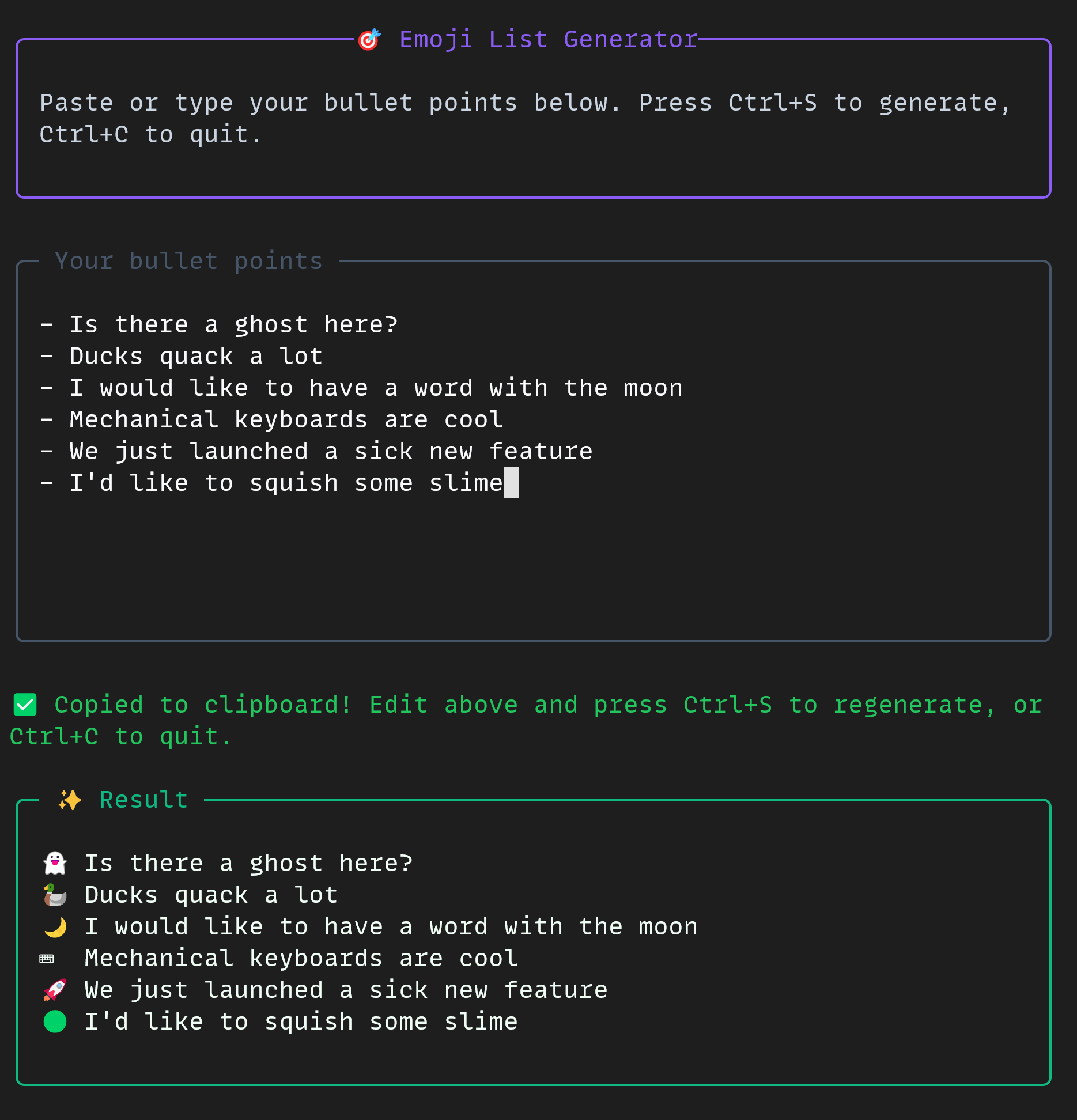 The project was small but mighty. In the CLI, we used some really cool tools all together:
 Multi-modelworkflow

 The
TheIf you’d like to build a project like this yourself, you can check out the docs forthe GitHub Copilot CLIand theGitHub Copilot SDKtoday!
Theemoji list generator is free and open source, just for you.
Happy building!
- * *
Tags:
Written by
[Cassidy Williams](https://github.blog/author/cassidoo/)
Cassidy is senior director for developer advocacy here at GitHub. She enjoys building software, advising startups, and teaching developers how to build better. She has a weekly newsletter at cassidoo.co/newsletter where you can get her updates, practice coding problems, and a joke in your inbox!
Table of Contents
More on [GitHub Copilot](https://github.blog/tag/github-copilot/)
[Build a personal organization command center with GitHub Copilot CLI](https://github.blog/ai-and-ml/github-copilot/build-a-personal-organization-command-center-with-github-copilot-cli/)
Learn about the productivity tool one GitHub engineer built, and how AI supported the development process.
[Cassidy Williams](https://github.blog/author/cassidoo/ "Posts by Cassidy Williams")&[Jacklyn Carroll](https://github.blog/author/jacklynlee31/ "Posts by Jacklyn Carroll")
[GitHub Copilot CLI for Beginners: Getting started with GitHub Copilot CLI](https://github.blog/ai-and-ml/github-copilot/github-copilot-cli-for-beginners-getting-started-with-github-copilot-cli/)
GitHub for Beginners: Getting started with the GitHub Copilot CLI, a step-by-step tutorial.
[Christopher Harrison](https://github.blog/author/geektrainer/ "Posts by Christopher Harrison")
Related posts

[Build a personal organization command center with GitHub Copilot CLI](https://github.blog/ai-and-ml/github-copilot/build-a-personal-organization-command-center-with-github-copilot-cli/)
Learn about the productivity tool one GitHub engineer built, and how AI supported the development process.
[Cassidy Williams](https://github.blog/author/cassidoo/ "Posts by Cassidy Williams")&[Jacklyn Carroll](https://github.blog/author/jacklynlee31/ "Posts by Jacklyn Carroll")

[Hack the AI agent: Build agentic AI security skills with the GitHub Secure Code Game](https://github.blog/security/hack-the-ai-agent-build-agentic-ai-security-skills-with-the-github-secure-code-game/)
Learn to find and exploit real-world agentic AI vulnerabilities through five progressive challenges in this free, open source game that over 10,000 developers have already used to sharpen their security skills.
[Joseph Katsioloudes](https://github.blog/author/jkcso/ "Posts by Joseph Katsioloudes")

[GitHub Copilot CLI for Beginners: Getting started with GitHub Copilot CLI](https://github.blog/ai-and-ml/github-copilot/github-copilot-cli-for-beginners-getting-started-with-github-copilot-cli/)
GitHub for Beginners: Getting started with the GitHub Copilot CLI, a step-by-step tutorial.
[Christopher Harrison](https://github.blog/author/geektrainer/ "Posts by Christopher Harrison")
Explore more from GitHub

Docs
Everything you need to master GitHub, all in one place.

GitHub
Build what’s next on GitHub, the place for anyone from anywhere to build anything.

Customer stories
Meet the companies and engineering teams that build with GitHub.

The GitHub Podcast
Catch up on the GitHub podcast, a show dedicated to the topics, trends, stories and culture in and around the open source developer community on GitHub.
We do newsletters, too
Discover tips, technical guides, and best practices in our biweekly newsletter just for devs.
Your email address
*Your email address
Subscribe
- [x] Yes please, I’d like GitHub and affiliates to use my information for personalized communications, targeted advertising and campaign effectiveness. See the GitHub Privacy Statement for more details.
Subscribe
Site-wide Links
[](https://github.com/)
Product
Platform
Support
Company
- GitHub on LinkedIn
- GitHub on Instagram
- GitHub on YouTube
- GitHub on X
- GitHub on TikTok
- GitHub on Twitch
- GitHub’s organization on GitHub
×
