SDK-Style Support for Extension Projects

TL;DR · AI 摘要
微软宣布在Visual Studio中为扩展项目引入SDK风格支持,简化配置和提高跨平台兼容性。
核心要点
- SDK风格支持简化了扩展项目的配置。
- 新功能提高了跨平台开发的兼容性和效率。
- 开发者可以更轻松地管理和维护扩展项目。
结构提纲
按章节快速跳转。
思维导图
用一张图看清主题之间的关系。
查看大纲文本(无障碍 / 无 JS 友好)
- SDK-Style Support for Extension Projects
金句 / Highlights
值得收藏与分享的关键句。
SDK风格支持简化了扩展项目的配置,减少了手动设置的复杂性。
新的SDK风格支持提高了跨平台开发的兼容性和效率。
开发者可以更轻松地管理和维护扩展项目,提升开发体验。
SDK-Style Support for Extension Projects - Visual Studio Blog

Dev Blogs
Dev Blogs
* Developer
- Microsoft for Developers
- Visual Studio
- Visual Studio Code
- Develop from the cloud
- All things Azure
- Xcode
- DevOps
- Windows Developer
- ISE Developer
- Azure SDK
- Command Line
- Aspire
* Technology
* Languages
* .NET
* Platform Development
- #ifdef Windows
- Microsoft Foundry
- Azure Government
- Azure VM Runtime Team
- Bing Dev Center
- Microsoft Edge Dev
- Microsoft Azure
- Microsoft 365 Developer
- Microsoft Entra Identity Developer
- Old New Thing
- Power Platform
* Data Development
- More
Theme
Search Search
- No results
Cancel
- Dev Blogs
- Visual Studio Blog
- SDK-Style Support for Extension Projects
April 29th, 2026
 1 reaction
SDK-Style Support for Extension Projects

Table of contents
Table of contents
[Show more](javascript:)
Read next
April 28, 2026
[Visual Studio April Update – Cloud Agent Integration](https://devblogs.microsoft.com/visualstudio/visual-studio-april-update-cloud-agent-integration/)

Mark Downie
April 16, 2026
[From AI to .NET: 20 VS Live! Las Vegas Sessions You Can Watch Now](https://devblogs.microsoft.com/visualstudio/from-ai-to-net-20-vs-live-las-vegas-sessions-you-can-watch-now/)

Jim Harrer
Starting in Visual Studio 18.5, you can create and build Visual Studio extensions (VSIX) using an officially supported SDK-style project. This brings VSIX projects into the modern build and deployment pipeline, improving incremental build performance and making the build → deploy → debug workflow more reliable. Install the Visual Studio extension development workload to get the templates and toolingand try it out for yourself!
Note: Extensions written using the modern VisualStudio.Extensibility framework already supports SDK-style projects today. This update extends the same SDK-style experience to VSSDK-based Visual Studio extensions.
What We Are Adding:Copy link
- Official SDK-style support for projects that produce VSSDK-based extensions.
- Build time reductions of up to 75%! We’ve added end-to-end incremental build support including Fast Up To Date Check and up to date deployment logic. Through internal adoption, we see a reduction of up to 75% in build time in large solutions for small changes or changes confined to a single sub project.
- Updated in-box templates: SDK-style by default, with the familiar project items (tool windows, classifiers, commands, etc.).
Project Usage Copy link
Creating a project is done the same way you are used to, using the “VSIX Project” or “Empty VSIX Project” template:
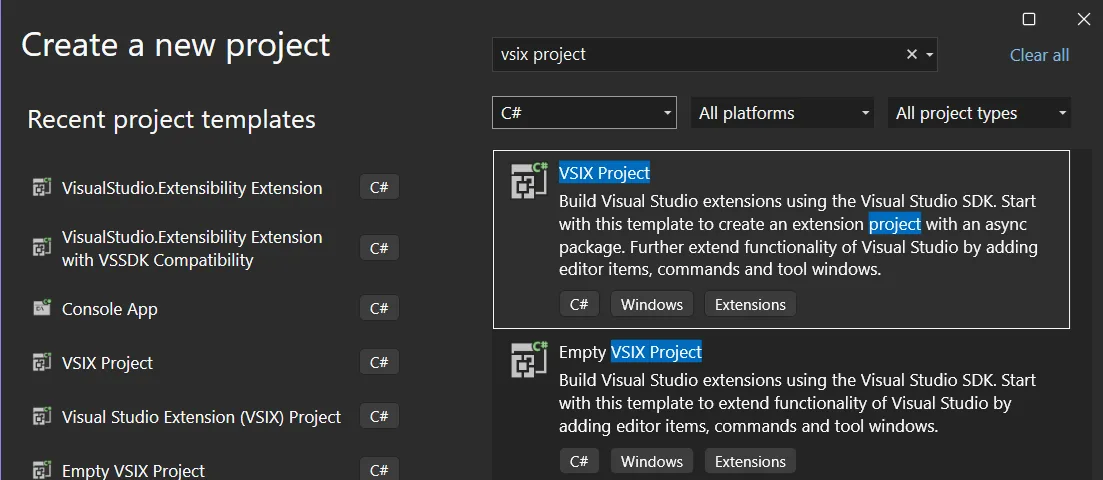
This will yield a much more compact csproj than before: only 20 lines:
Copy
<Project Sdk="Microsoft.NET.Sdk">

  <PropertyGroup>
    <TargetFramework>net472</TargetFramework>
    <Nullable>enable</Nullable>
    <LangVersion>14</LangVersion>

    <!-- VSIX settings -->
    <VSSDKBuildToolsAutoSetup>true</VSSDKBuildToolsAutoSetup>
    <VsixDeployOnDebug>true</VsixDeployOnDebug>
    <GeneratePkgDefFile>true</GeneratePkgDefFile>
  </PropertyGroup>
  <ItemGroup>
    <ProjectCapability Include="CreateVsixContainer" />
  </ItemGroup>

  <ItemGroup>
    <PackageReference Include="Microsoft.VisualStudio.SDK" Version="17.14.40265" ExcludeAssets="runtime" />
    <PackageReference Include="Microsoft.VSSDK.BuildTools" Version="18.5.38461" />
  </ItemGroup>
</Project>
Does it impact my extension?Copy link
- If you create a new extension, you will automatically get full SDK-Style support.
- Your existing MPF style extension will continue to work should you choose not to migrate. This update adds an _official_ SDK-style option; it doesn’t force a conversion.
- You can update your project to an SDK-style project file to take advantage of these features.
- Vsixmanifest files included in SDK-style projects now open by default in the XML editor. The old designer is still available through the ‘Open With’ menu.
Migration In Brief Copy link
- I migrated an extension from Mads Kristensen as an example: Convert to SDK-style project by matthew-j-clark · Pull Request #6 · madskristensen/SelectedWhitespace · GitHub
- If you have any XAML, you need to add:
<UseWpf>true</UseWpf>to your csproj. - You must mark your extension as deployable in your SLN or SLNX file if you want it to deploy when you hit F5.
- You can do this in your SLNX like this: Copy
<Project Path="src/SelectedWhitespace.csproj">
    <Deploy Solution="Debug|Any CPU" />
</Project>- When available, you can do this in the project configuration: 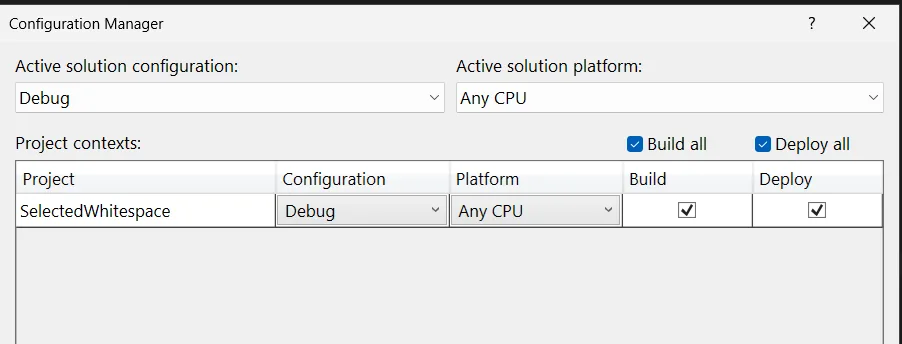
<VSSDKBuildToolsAutoSetup>true</VSSDKBuildToolsAutoSetup>will setup most sensible defaults for you and reduce the size of your csproj. This will setup options likeCreateVsixContaineras true, and the legacyDeployExtensionto false.<VsixDeployOnDebug>true</VsixDeployOnDebug>Should be added to your csproj if you will add it to other solution files to ensure the deploy checkbox is set automatically.
Agentic conversion Copy link
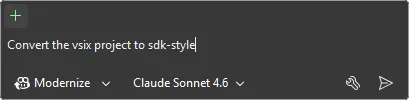
We’re experimenting with ways of making this as easy as possible for you. To that end, we’ve added an agent skill to the vs-agent-plugins repository you can use in conjunction with the Modernize agent. Let us know whether this workflow is helpful, or if you have a different agentic workflow in mind for extension development.
Reference projects Copy link
Here are a few extensions that are already converted, so you can use them as references.
We want to hear from you!Copy link
Please send us feedback and issues you encounter in Developer Community. Thank you, and happy extending!
[1](https://devblogs.microsoft.com/visualstudio/wp-login.php?redirect_to=https%3A%2F%2Fdevblogs.microsoft.com%2Fvisualstudio%2Fsdk-style-support-for-extension-projects%2F "Sign in to react")
[0](http://devblogs.microsoft.com/visualstudio/sdk-style-support-for-extension-projects/#comments "Go to comments section")
0
- 
- [Share on X](https://twitter.com/intent/tweet?url=https://devblogs.microsoft.com/visualstudio/sdk-style-support-for-extension-projects/&text=SDK-Style%20Support%20for%20Extension%20Projects "Share on X")
- 
Category
Topics
Share
- [](https://www.facebook.com/sharer/sharer.php?u=https://devblogs.microsoft.com/visualstudio/sdk-style-support-for-extension-projects/)
- [](https://twitter.com/intent/tweet?url=https://devblogs.microsoft.com/visualstudio/sdk-style-support-for-extension-projects/&text=SDK-Style%20Support%20for%20Extension%20Projects)
- [](https://www.linkedin.com/shareArticle?mini=true&url=https://devblogs.microsoft.com/visualstudio/sdk-style-support-for-extension-projects/)
Author
0 comments
Be the first to start the discussion.
[Leave a comment](javascript:void(0) "Leave a comment")[Cancel reply](http://devblogs.microsoft.com/visualstudio/sdk-style-support-for-extension-projects/#respond)
Stay informed
Get notified when new posts are published.
Email *
Country/Region *
I would like to receive the Visual Studio Blog Newsletter. Privacy Statement.
Subscribe
Follow this blog
- 
- [](https://twitter.com/VisualStudio "twitter")
- 
- 
- 
- 
- [](https://devblogs.microsoft.com/visualstudio/feed/ "RSS Feed")
Are you sure you wish to delete this comment?
OK Cancel
Insert/edit link
Close
Enter the destination URL
URL
Link Text
- [x] Open link in a new tab
Or link to existing content
Search
_No search term specified. Showing recent items._ _Search or use up and down arrow keys to select an item._
Cancel
##### Code Block
×
Paste your code snippet
Ok Cancel
What's new
- Surface Pro
- Surface Laptop
- Surface Laptop Studio 2
- Copilot for organizations
- Copilot for personal use
- AI in Windows
- Explore Microsoft products
- Windows 11 apps
Microsoft Store
- Account profile
- Download Center
- Microsoft Store support
- Returns
- Order tracking
- Certified Refurbished
- Microsoft Store Promise
- Flexible Payments
Education
- Microsoft in education
- Devices for education
- Microsoft Teams for Education
- Microsoft 365 Education
- How to buy for your school
- Educator training and development
- Deals for students and parents
- AI for education
Business
- Microsoft AI
- Microsoft Security
- Dynamics 365
- Microsoft 365
- Microsoft Power Platform
- Microsoft Teams
- Microsoft 365 Copilot
- Small Business
Developer & IT
- Azure
- Microsoft Developer
- Microsoft Learn
- Support for AI marketplace apps
- Microsoft Tech Community
- Microsoft Marketplace
- Marketplace Rewards
- Visual Studio
Company
- Careers
- About Microsoft
- Company news
- Privacy at Microsoft
- Investors
- Diversity and inclusion
- Accessibility
- Sustainability
Your Privacy ChoicesConsumer Health Privacy
- Sitemap
- Contact Microsoft
- Privacy
- Manage cookies
- Terms of use
- Trademarks
- Safety & eco
- Recycling
- About our ads
- © Microsoft 2026
[](http://devblogs.microsoft.com/visualstudio/sdk-style-support-for-extension-projects/#page "Back to top")
×
Notifications