Show HN: Semble – Code search for agents that uses 98% fewer tokens than grep

TL;DR · AI 摘要
Semble 是一个为代理设计的代码搜索库,使用 ~98% 更少的 token 提供快速准确的代码片段。
核心要点
- Semble 可以在 CPU 上运行,无需 API 密钥或 GPU。
- 索引和搜索整个代码库仅需不到 1 秒,比代码专用变压器快 200 倍。
- Semble 支持多种代理(如 Claude Code、Codex)直接搜索任意代码库。
结构提纲
按章节快速跳转。
Semble is a code search library built for agents, returning exact code snippets instantly with ~98% fewer tokens than grep+read.
Semble uses natural language queries instead of traditional grep, returning relevant code snippets and saving a large number of tokens.
Semble runs on CPU, indexing a codebase 200 times faster than code-specialized transformers and querying 10 times faster.
Semble can be deployed as an MCP server or a bash tool, supporting multiple agent frameworks.
思维导图
用一张图看清主题之间的关系。
查看大纲文本(无障碍 / 无 JS 友好)
- Semble 代码搜索库
- 核心功能
- 快速搜索
- 高精度
- 低 token 消耗
- 部署方式
- MCP 服务器
- Bash 工具
金句 / Highlights
值得收藏与分享的关键句。
Semble uses ~98% fewer tokens to search code than grep+read, and indexes a codebase 200 times faster.
Semble supports multiple agents (such as Claude Code, Codex) to search any codebase directly.
Semble runs on CPU without API keys or GPU, achieving zero-configuration deployment.
Semble is a code search library built for agents. It returns the exact code snippets they need instantly, using ~98% fewer tokens than grep+read and cutting latency on every step. Indexing and searching a full codebase end-to-end takes under a second, with ~200x faster indexing and ~10x faster queries than a code-specialized transformer, at 99% of its retrieval quality (see benchmarks). Everything runs on CPU with no API keys, GPU, or external services. Run it as an MCP server or call it from the shell via AGENTS.md and any agent (Claude Code, Cursor, Codex, OpenCode, etc.) gets instant access to any repo.
Quickstart
[](https://github.com/MinishLab/semble#quickstart) Your agent will automatically use Semble whenever it needs to find code. Instead of grepping with a keyword and reading full files, it queries in natural language (e.g. "How is authentication handled?") and gets back only the relevant context. Semble can be set up as an MCP server or as a bash tool:
MCP
[](https://github.com/MinishLab/semble#mcp) Add Semble to Claude Code (requires uv):
claude mcp add semble -s user -- uvx --from "semble[mcp]" semble
Using another agent harness? See MCP Server for setup instructions for Codex, OpenCode, Cursor, and other MCP clients.
Bash / AGENTS.md
[](https://github.com/MinishLab/semble#bash--agentsmd) Install Semble first, then add the code search snippet to your AGENTS.md or CLAUDE.md:
pip install semble # Install with pip uv tool install semble # Or install with uv
Note: for Claude Code or Codex CLI sub-agents, use the bash integration instead of, or alongside, MCP.
To update Semble, see Updating.
Curious how many tokens Semble has saved you? Run semble savings to see. See Savings for details.
Main Features
[](https://github.com/MinishLab/semble#main-features)
- Fast: indexes an average repo in ~250 ms and answers queries in ~1.5 ms, all on CPU.
- Accurate: NDCG@10 of 0.854 on our benchmarks, on par with code-specialized transformer models, at a fraction of the size and cost.
- Token-efficient: returns only the relevant chunks, using ~98% fewer tokens than grep+read.
- Zero setup: runs on CPU with no API keys, GPU, or external services required.
- MCP server: drop-in tool for Claude Code, Cursor, Codex, OpenCode, and any other MCP-compatible agent.
- Local and remote: pass a local path or a git URL.
MCP Server
[](https://github.com/MinishLab/semble#mcp-server) Semble can run as an MCP server so agents can search any codebase directly. Repos are cloned and indexed on demand, and indexes are cached for the lifetime of the session. Local paths are watched for file changes and re-indexed automatically.
Setup
[](https://github.com/MinishLab/semble#setup)
Requires uv to be installed.
#### Claude Code
[](https://github.com/MinishLab/semble#claude-code)
claude mcp add semble -s user -- uvx --from "semble[mcp]" semble
#### Codex
[](https://github.com/MinishLab/semble#codex) Add to ~/.codex/config.toml:
[mcp_servers.semble] command = "uvx" args = ["--from", "semble[mcp]", "semble"]
#### OpenCode
[](https://github.com/MinishLab/semble#opencode) Add to ~/.opencode/config.json:
{ "mcp": { "semble": { "type": "local", "command": ["uvx", "--from", "semble[mcp]", "semble"] } } }
#### Cursor
[](https://github.com/MinishLab/semble#cursor) Add to ~/.cursor/mcp.json (or .cursor/mcp.json in your project):
{ "mcpServers": { "semble": { "command": "uvx", "args": ["--from", "semble[mcp]", "semble"] } } }
Tools
[](https://github.com/MinishLab/semble#tools) | Tool | Description | | --- | --- | | search | Search a codebase with a natural-language or code query. Pass repo as a local directory path or an https:// git URL. | | find_related | Given a file path and line number, return chunks semantically similar to the code at that location. |
Bash integration
[](https://github.com/MinishLab/semble#bash-integration) An alternative to MCP is to invoke Semble via Bash. For Claude Code and Codex CLI, this is the only option for sub-agents, which cannot call MCP tools directly (both lazy-load MCP schemas at the top-level agent only).
To add Bash support, append the following to your AGENTS.md or CLAUDE.md:
Code Search
Use semble search to find code by describing what it does or naming a symbol/identifier, instead of grep:
``bash semble search "authentication flow" ./my-project semble search "save_pretrained" ./my-project semble search "save model to disk" ./my-project --top-k 10 ``
Use semble find-related to discover code similar to a known location (pass file_path and line from a prior search result):
``bash semble find-related src/auth.py 42 ./my-project ``
path defaults to the current directory when omitted; git URLs are accepted.
If semble is not on $PATH, use uvx --from "semble[mcp]" semble in its place.
Workflow
- Start with
semble searchto find relevant chunks. - Inspect full files only when the returned chunk is not enough context.
- Optionally use
semble find-relatedwith a promising result'sfile_pathandlineto discover related implementations. - Use grep only when you need exhaustive literal matches or quick confirmation of an exact string.
Claude Code sub-agent: Claude Code also supports a dedicated sub-agent. Run this once in your project root:
semble init
or, if semble is not on $PATH:
uvx --from "semble[mcp]" semble init
This writes `.claude/agents/semble-search.md`.
CLI
[](https://github.com/MinishLab/semble#cli) Semble also ships as a standalone CLI for use outside of MCP. This is useful in scripts or anywhere you want search results without an MCP session.
Search a local repo
semble search "authentication flow" ./my-project
Search for a symbol or identifier
semble search "save_pretrained" ./my-project
Search a remote repo (cloned on demand)
semble search "save model to disk" https://github.com/MinishLab/model2vec
Find code similar to a known location (file_path and line from a prior search result)
semble find-related src/auth.py 42 ./my-project
path defaults to the current directory when omitted; git URLs are accepted.
If semble is not on $PATH, use uvx --from "semble[mcp]" semble in its place.
Savings
[](https://github.com/MinishLab/semble#savings) semble savings shows how many tokens semble has saved across all your searches:
semble savings # summary by period semble savings --verbose # also show breakdown by call type
Semble Token Savings
  ════════════════════════════════════════════════════════════════
  Period        Calls   Savings
  ────────────────────────────────────────────────────────────────
  Today         42      [███████████████░]  ~58.4k tokens (95%)
  Last 7 days   287     [██████████████░░]  ~312.4k tokens (90%)
  All time      1.4k    [██████████████░░]  ~1.2M tokens (89%)
How savings are calculated: for each call, semble records the total character count of the unique files containing returned chunks and the character count of the snippets returned. Estimated tokens saved is (file chars − snippet chars) / 4 (4 chars per token). This is a conservative estimate: the baseline is reading matched files in full, which is how coding agents often explore unfamiliar code.
Stats are stored in ~/.semble/savings.jsonl.
Updating
[](https://github.com/MinishLab/semble#updating) To update/upgrade Semble to the latest version:
pip install --upgrade semble # with pip uv tool upgrade semble # with uv uv cache clean semble # for MCP users (restart your MCP client after)
Python API
[](https://github.com/MinishLab/semble#python-api) Semble can also be used as a Python library for programmatic access, useful when building custom tooling or integrating search directly into your own code.
from semble import SembleIndex
Index a local directory
index = SembleIndex.from_path("./my-project")
Index a remote git repository
index = SembleIndex.from_git("https://github.com/MinishLab/model2vec")
Search the index with a natural-language or code query
results = index.search("save model to disk", top_k=3)
Find code similar to a specific result
related = index.find_related(results[0], top_k=3)
Each result exposes the matched chunk
result = results[0] result.chunk.file_path # "model2vec/model.py" result.chunk.start_line # 127 result.chunk.end_line # 150 result.chunk.content # "def save_pretrained(self, path: PathLike, ..."
How it works
[](https://github.com/MinishLab/semble#how-it-works) Semble splits each file into code-aware chunks using Chonkie, then scores every query against the chunks with two complementary retrievers: static Model2Vec embeddings using the code-specialized potion-code-16M model for semantic similarity, and BM25 for lexical matches on identifiers and API names. The two score lists are fused with Reciprocal Rank Fusion (RRF).
After fusing, results are reranked with a set of code-aware signals:
Ranking signals
- Adaptive weighting. Symbol-like queries (
Foo::bar,_private,getUserById) get more lexical weight, while natural-language queries stay balanced between semantic and lexical retrievers. - Definition boosts. A chunk that defines the queried symbol (a
class,def,func, etc.) is ranked above chunks that merely reference it. - Identifier stems. Query tokens are stemmed and matched against identifier stems in a chunk, giving an additional weight to chunks that contain them. For example, querying
parse configboosts chunks containingparseConfig,ConfigParser, orconfig_parser. - File coherence. When multiple chunks from the same file match the query, the file is boosted so the top result reflects broad file-level relevance rather than a single out-of-context chunk.
- Noise penalties. Test files,
compat//legacy/shims, example code, and.d.tsdeclaration stubs are down-ranked so canonical implementations surface first.
Because the embedding model is static with no transformer forward pass at query time, all of this runs in milliseconds on CPU.
Benchmarks
[](https://github.com/MinishLab/semble#benchmarks) We benchmark quality and speed across all methods on ~1,250 queries over 63 repositories in 19 languages. The x-axis is total latency (index + first query); the y-axis is NDCG@10. Marker size reflects model parameter count.
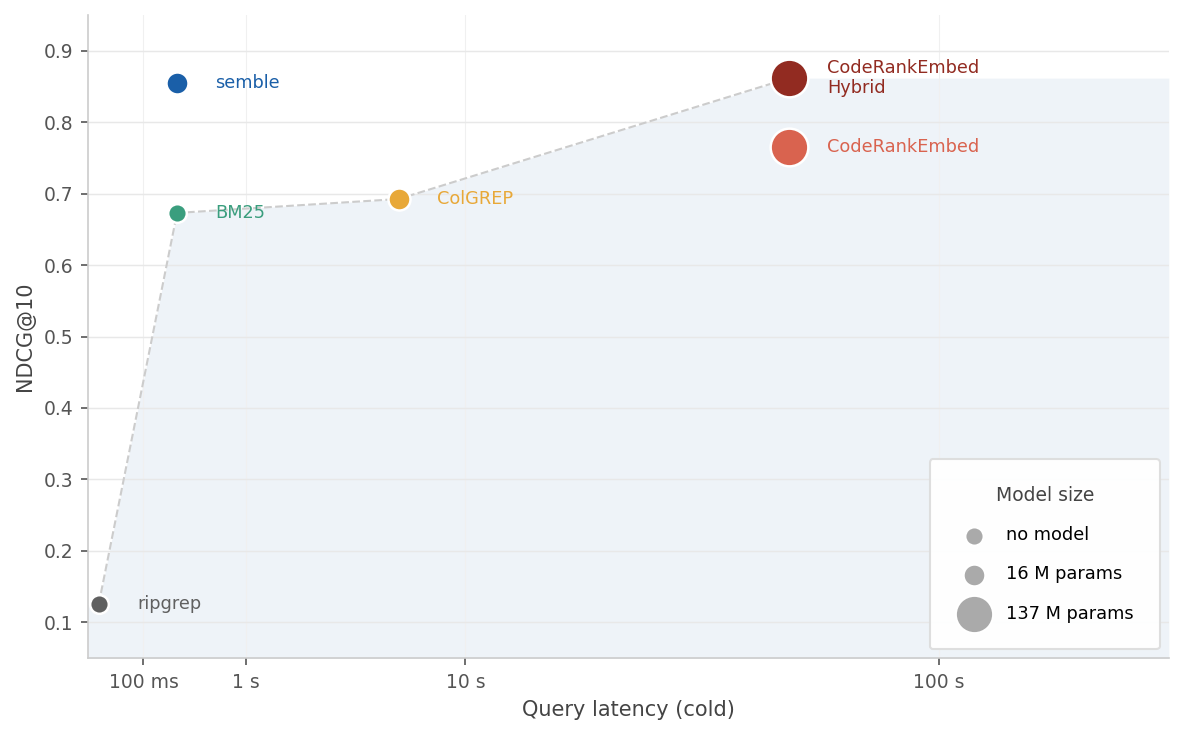
| Method | NDCG@10 | Index time | Query p50 | | --- | --- | --- | --- | | CodeRankEmbed Hybrid | 0.862 | 57 s | 16 ms | | semble | 0.854 | 263 ms | 1.5 ms | | CodeRankEmbed | 0.765 | 57 s | 16 ms | | ColGREP | 0.693 | 5.8 s | 124 ms | | BM25 | 0.673 | 263 ms | 0.02 ms | | grepai | 0.561 | 35 s | 48 ms | | probe | 0.387 | — | 207 ms | | ripgrep | 0.126 | — | 12 ms |
Semble achieves 99% of the performance of the 137M-parameter CodeRankEmbed Hybrid, while indexing 218x faster and answering queries 11x faster. See benchmarks for per-language results, ablations, and methodology.
Token efficiency
[](https://github.com/MinishLab/semble#token-efficiency) Agents using grep+read spend most of their context budget on irrelevant code. Semble returns only the chunks that match, keeping token usage low even at high recall.
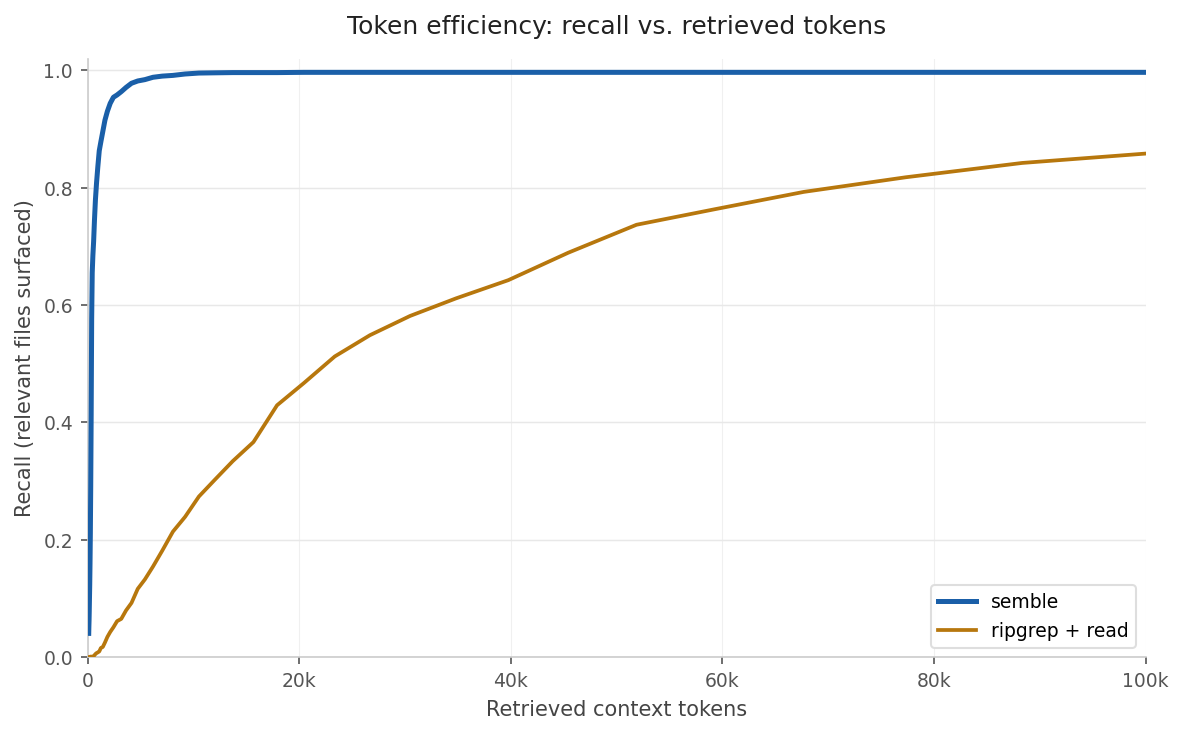
Semble uses 98% fewer tokens on average, and reaches 94% recall at a budget of only 2k tokens, while grep+read needs a full 100k context window to reach 85%. See benchmarks for details.
License
[](https://github.com/MinishLab/semble#license) MIT
Citing
[](https://github.com/MinishLab/semble#citing) If you use Semble in your research, please cite the following:
@software{minishlab2026semble, author = {{van Dongen}, Thomas and Stephan Tulkens}, title = {Semble: Fast and Accurate Code Search for Agents}, year = {2026}, publisher = {Zenodo}, doi = {10.5281/zenodo.19785932}, url = {https://github.com/MinishLab/semble}, license = {MIT} }