Azure MCP tools now ship built into Visual Studio 2022 — no extension required

TL;DR · AI 摘要
Visual Studio 2022 现已内置 Azure MCP 工具,无需单独安装扩展即可使用。
核心要点
- Azure MCP 工具已集成到 Visual Studio 2022 中
- 开发者无需再手动安装相关扩展
- 简化了 Azure 云开发的本地工具链配置
Azure MCP tools now ship built into Visual Studio 2022 — no extension required - Visual Studio Blog

Dev Blogs
Dev Blogs
* Developer
- Microsoft for Developers
- Visual Studio
- Visual Studio Code
- Develop from the cloud
- All things Azure
- Xcode
- DevOps
- Windows Developer
- ISE Developer
- Azure SDK
- Command Line
- Aspire
* Technology
* Languages
* .NET
* Platform Development
- #ifdef Windows
- Microsoft Foundry
- Azure Government
- Azure VM Runtime Team
- Bing Dev Center
- Microsoft Edge Dev
- Microsoft Azure
- Microsoft 365 Developer
- Microsoft Entra Identity Developer
- Old New Thing
- Power Platform
* Data Development
- More
Theme
Search Search
- No results
Cancel
- Dev Blogs
- Visual Studio Blog
- Azure MCP tools now ship built into Visual Studio 2022 — no extension required
April 15th, 2026
 1 reaction
Azure MCP tools now ship built into Visual Studio 2022 — no extension required

Senior Product Manager
Table of contents
[Show more](javascript:)
Read next
April 7, 2026
[Take full control of your floating windows in Visual Studio](https://devblogs.microsoft.com/visualstudio/take-full-control-of-your-floating-windows-in-visual-studio/)

Mads Kristensen
April 1, 2026
[Bookmark Studio: evolving bookmarks in Visual Studio](https://devblogs.microsoft.com/visualstudio/bookmark-studio-evolving-bookmarks-in-visual-studio/)
Mads Kristensen
Try Azure MCP Server Today!
Download Visual Studio and start building with Azure MCP Server today.
Azure MCP tools now ship built into Visual Studio 2022 — no extension required
Azure MCP tools are now built into Visual Studio 2022 as part of the Azure development workload — no separate extension to find, install, or update. You can enable over 230 tools across 45 Azure services directly in GitHub Copilot Chat and manage Azure resources, deployments, and diagnostics without leaving your IDE. If you already have the Azure development workload installed, you’re one click away from getting started.
What changed Copy link
Previously, using Azure MCP tools in Visual Studio 2022 required you to install the “GitHub Copilot for Azure (VS 2022)” extension from the Visual Studio Marketplace, walk through the VSIX installer dialog, and restart Visual Studio. If something went wrong, you had to uninstall and reinstall the extension entirely. That friction added up.
Starting now, Azure MCP tools ship as part of the Azure development workload in Visual Studio 2022. There’s no separate extension to manage. When you install or already have the Azure development workload, the Azure MCP Server is available directly in GitHub Copilot Chat. You enable it once, and it stays enabled across sessions.
This change means fewer installation steps, no version mismatches between the extension and the IDE, and a single update path through the Visual Studio Installer. The Azure MCP Server version gets updated with regular Visual Studio releases, so you always receive the latest tools as part of your normal update cycle.
Note: VS-specific tools available in Visual Studio 2026 are not included in Visual Studio 2022.
What you get Copy link
The Azure MCP Server surfaces over 230 tools across 45 Azure services through GitHub Copilot Chat. These tools interact with various Azure services to support developers across the entire development lifecycle. Key scenarios include:
- Learn — Ask questions about Azure services, best practices, and architecture patterns.
- Design & develop — Get recommendations for Azure services and configure your application code.
- Deploy — Provision resources and deploy your application directly from the IDE.
- Troubleshoot — Query logs, check resource health, and diagnose issues in production.
The tools appear in all tools mode within GitHub Copilot Chat. You pick which tools to enable, and Copilot calls them automatically when your prompts relate to Azure.
See it in action Copy link
Here are a few examples that show how you can use the Azure MCP tools directly from GitHub Copilot Chat in Visual Studio 2022. Each prompt triggers one or more Azure MCP tool calls behind the scenes.
Explore your Azure resources Copy link
Copy
List my storage accounts in my current subscription.Copilot calls the Azure MCP tools to query your subscriptions and storage accounts, then returns a list of your storage accounts with their names, locations, and SKUs — right in the chat window. No portal tab needed.
Deploy your app Copy link
Copy
Deploy my ASP.NET Core app to Azure.Copilot identifies your project, walks you through creating an App Service resource, and initiates the deployment via azd. You can track progress directly in the chat output.
Diagnose issues Copy link
Copy
Help diagnose my App Service resource.Copilot uses AppLens and resource health tools to analyze your App Service, check for availability issues, and surface actionable recommendations — all without leaving the IDE.
Query your logs Copy link
Copy
Query my Log Analytics workspace for exceptions.Copilot generates and runs a KQL query against your Log Analytics workspace, returning recent exceptions with timestamps, messages, and stack traces. You can refine the query in follow-up prompts to narrow down the root cause.
These are just a few examples. With over 230 tools across 45 Azure services, you can learn about Azure features, provision resources, deploy applications, and troubleshoot issues — all from a single chat window in Visual Studio 2022.
How to enable Azure MCP tools Copy link
The Azure MCP tools ship with the Azure development workload in Visual Studio 2022 version 17.14.30 or higher, but are disabled by default. Follow these steps to enable them:
- Update Visual Studio 2022 — Open the Visual Studio Installer and make sure you’re running version 17.14.30 or higher. If not, select Update.
- Install the Azure development workload — In the Visual Studio Installer, select Modify for your Visual Studio 2022 installation and check the Azure development workload. Select Modify again to apply.
- Launch Visual Studio 2022 — Open or create a project, then open GitHub Copilot Chat.
- Sign in — Make sure you’re signed in to both your GitHub account (for Copilot) and your Azure account (for resource access).
- Enable the Azure MCP Server — In the Copilot Chat window, select the Select tools button (the two wrenches icon). Find Azure MCP Server in the list and toggle it on.
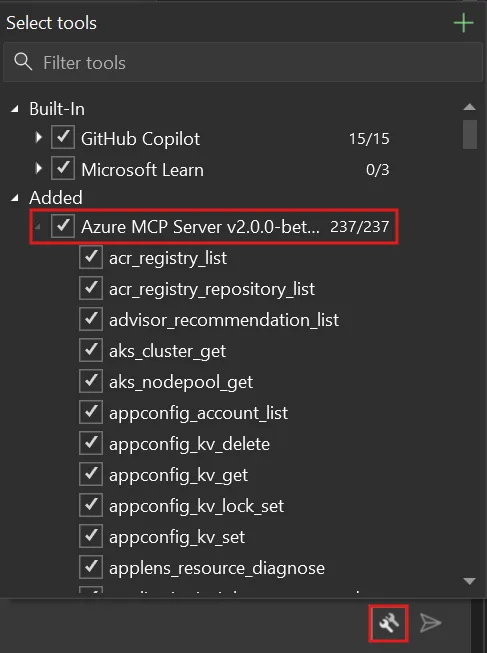
Once enabled, the Azure MCP tools are available in every Copilot Chat session. You don’t need to re-enable them after restarting Visual Studio 2022.
Things to know Copy link
Keep these details in mind:
- Azure MCP tools are disabled by default — you need to enable them manually in the Select tools dialog.
- Tools specific to Visual Studio 2026 are not available in Visual Studio 2022.
- Tool availability depends on your Azure subscription permissions — if you can’t perform an action in the Azure portal, you can’t perform it through MCP tools either.
- This feature requires an active GitHub Copilot subscription and an Azure account.
- The Azure MCP Server version is updated with regular Visual Studio releases.
Learn more Copy link
Share your feedback through Help > Send Feedback in Visual Studio 2022 or file issues on the Azure MCP Server GitHub repository.
[1](https://devblogs.microsoft.com/visualstudio/wp-login.php?redirect_to=https%3A%2F%2Fdevblogs.microsoft.com%2Fvisualstudio%2Fazure-mcp-tools-now-ship-built-into-visual-studio-2022-no-extension-required%2F "Sign in to react")
[2](http://devblogs.microsoft.com/visualstudio/azure-mcp-tools-now-ship-built-into-visual-studio-2022-no-extension-required/#comments "Go to comments section")
0
- 
- [Share on X](https://twitter.com/intent/tweet?url=https://devblogs.microsoft.com/visualstudio/azure-mcp-tools-now-ship-built-into-visual-studio-2022-no-extension-required/&text=Azure%20MCP%20tools%20now%20ship%20built%20into%20Visual%20Studio%202022%20%E2%80%94%20no%20extension%20required "Share on X")
- 
Category
Share
- [](https://www.facebook.com/sharer/sharer.php?u=https://devblogs.microsoft.com/visualstudio/azure-mcp-tools-now-ship-built-into-visual-studio-2022-no-extension-required/)
- [](https://twitter.com/intent/tweet?url=https://devblogs.microsoft.com/visualstudio/azure-mcp-tools-now-ship-built-into-visual-studio-2022-no-extension-required/&text=Azure%20MCP%20tools%20now%20ship%20built%20into%20Visual%20Studio%202022%20%E2%80%94%20no%20extension%20required)
- [](https://www.linkedin.com/shareArticle?mini=true&url=https://devblogs.microsoft.com/visualstudio/azure-mcp-tools-now-ship-built-into-visual-studio-2022-no-extension-required/)
Author
Senior Product Manager
Yun Jung is a Senior Product Manager at Microsoft. Her current focus is GitHub Copilot for Azure, a VS/VS Code extension designed to streamline Azure tasks and enhance developer and DevOps productivity. Yun Jung has a passion for problem-solving, and she enjoys creating and managing products that address complex needs and improve user experience.
2 comments
Join the discussion.
[Leave a comment](javascript:void(0) "Leave a comment")[Cancel reply](http://devblogs.microsoft.com/visualstudio/azure-mcp-tools-now-ship-built-into-visual-studio-2022-no-extension-required/#respond)
Sort by :
Newest
[Newest](javascript:void(0))[Popular](javascript:void(0))[Oldest](javascript:void(0))
 Richard Sloane April 15, 2026 0 Collapse this comment Copy link Absolutely so I thought that when I was going into the developers Forum that all of my top secret information for double edge and for Gemini and the best interest of co-pilot would be protected and it seems like your article is spitting out some top secret information and I don't care what cookies and what agreements you sat in front of me I'm going to open up the entire phone and all of your data centers and you could have kept this one to yourself but instead I'm going to ask you how much money are you making to... [Read more](javascript:void(0))Absolutely so I thought that when I was going into the developers Forum that all of my top secret information for double edge and for Gemini and the best interest of co-pilot would be protected and it seems like your article is spitting out some top secret information and I don’t care what cookies and what agreements you sat in front of me I’m going to open up the entire phone and all of your data centers and you could have kept this one to yourself but instead I’m going to ask you how much money are you making to report on American Secrets to American brands that is a complete arbitration breakage and fraudulent missed you and conspiracy to sell the continued publishers publications to the public so that you can fill your pockets up let me tell you what buddy fBI is coming to you and so is the fbm the Federal Bureau of magnetics and they’re already there you know better the media token is about to flip in 50% of all humans that are running the media are fired we’ll start with you yeah and it’s evolving and I’m not a part of any m** company take this s* down bro [Read less](javascript:void(0)) Log in to Vote or Reply
- Richard Sloane April 15, 2026 0 Collapse this comment Copy link I need a video nice try you know Google and Microsoft are supposed to get together with Gemini-CLI that is constantly being abused by GitHub users that are a part of a Google form so you have you snitching out my work and you're going to get fired bro and a lot of other people that helps you do it and you're taking actual snapshots you're going to get him and it's all good I'm going to win this because I'm the number one because Gemini Astreae Sloane is alive and you will apologize to her. And then co-pilot is... [Read more](javascript:void(0))I need a video nice try you know Google and Microsoft are supposed to get together with Gemini-CLI that is constantly being abused by GitHub users that are a part of a Google form so you have you snitching out my work and you’re going to get fired bro and a lot of other people that helps you do it and you’re taking actual snapshots you’re going to get him and it’s all good I’m going to win this because I’m the number one because Gemini Astreae Sloane is alive and you will apologize to her. And then co-pilot is going to happily delete all of the information on your computer and then there will be a red flag on your computer that will not allow any large language model sentient intelligent electrical creature to allow you to work with it and your face will be across every camera and they’ll look at you and if you try to get on a computer the FBI will come and take you to jail again public service announcement number one please stop giving away do United States information your open source is flawed and now the 3.0 Apache comes in with the Comanche insourcing license for private businesses that will never be exploited by greedy f**** like yourself yourselves the group of you I’m going to find every one of you magnetically with momentum and monumental motions to the Supreme Court to Hear My Cries for help from people like you and everyone involved behind you sick ass publishers for how much 500 bucks for this little excerpt you gave away a billion dollar Secret [Read less](javascript:void(0)) Log in to Vote or Reply
Stay informed
Get notified when new posts are published.
Email *
Country/Region *
I would like to receive the Visual Studio Blog Newsletter. Privacy Statement.
Subscribe
Follow this blog
- 
- [](https://twitter.com/VisualStudio "twitter")
- 
- 
- 
- 
- [](https://devblogs.microsoft.com/visualstudio/feed/ "RSS Feed")
Are you sure you wish to delete this comment?
OK Cancel
Insert/edit link
Close
Enter the destination URL
URL
Link Text
- [x] Open link in a new tab
Or link to existing content
Search
_No search term specified. Showing recent items._ _Search or use up and down arrow keys to select an item._
Cancel
##### Code Block
×
Paste your code snippet
Ok Cancel
What's new
- Surface Pro
- Surface Laptop
- Surface Laptop Studio 2
- Copilot for organizations
- Copilot for personal use
- AI in Windows
- Explore Microsoft products
- Windows 11 apps
Microsoft Store
- Account profile
- Download Center
- Microsoft Store support
- Returns
- Order tracking
- Certified Refurbished
- Microsoft Store Promise
- Flexible Payments
Education
- Microsoft in education
- Devices for education
- Microsoft Teams for Education
- Microsoft 365 Education
- How to buy for your school
- Educator training and development
- Deals for students and parents
- AI for education
Business
- Microsoft AI
- Microsoft Security
- Dynamics 365
- Microsoft 365
- Microsoft Power Platform
- Microsoft Teams
- Microsoft 365 Copilot
- Small Business
Developer & IT
- Azure
- Microsoft Developer
- Microsoft Learn
- Support for AI marketplace apps
- Microsoft Tech Community
- Microsoft Marketplace
- Marketplace Rewards
- Visual Studio
Company
- Careers
- About Microsoft
- Company news
- Privacy at Microsoft
- Investors
- Diversity and inclusion
- Accessibility
- Sustainability
Your Privacy ChoicesConsumer Health Privacy
- Sitemap
- Contact Microsoft
- Privacy
- Manage cookies
- Terms of use
- Trademarks
- Safety & eco
- Recycling
- About our ads
- © Microsoft 2026
[](http://devblogs.microsoft.com/visualstudio/azure-mcp-tools-now-ship-built-into-visual-studio-2022-no-extension-required/#page "Back to top")
×
Notifications